Product Pricing in Subotiz allows merchants to define how products are billed, including subscription billing rules and billing cycles. This feature helps standardize pricing configuration, streamline billing operations, and ensure consistent order and subscription calculations.
Product Pricing Overview
Each Product Pricing entry is linked to a product and defines how the product is billed. You can create multiple pricing options under the same product to offer different ways to charge customers, such as monthly or annual subscriptions, trial-based pricing, or one-time payments.
Each Product Pricing entry includes:
- Product name: Shown on checkout and invoices
- Charge type: Recurring subscription or one-time payment
- Billing cycle: How often customers are charged, such as weekly, monthly, quarterly, or yearly
- Price: Amount charged per billing cycle, or a one-time fee
- Trial period (optional): Free or paid trial before the first full charge
- Plan description: Additional details displayed on checkout and invoices
- Feature (optional): Defines the benefits included in each pricing option to differentiate plans under the same product. Displayed on the pricing page for customer reference.
Best practice: Use clear, concise names so customers understand what they are paying for.
Product Pricing Types
-
Recurring subscription: Use for ongoing billing, such as SaaS monthly or annual subscriptions
- Trial setup: Set free or paid trials with custom duration and pricing
- Custom pricing: Define different prices for specific billing cycles (for example, discounted pricing for the first 1–3 cycles, then standard pricing from cycle 4 onward)
- One-time payment: Use for single-charge scenarios, such as setup fees or lifetime purchases. Does not renew or create a subscription.
Product and Pricing Relationships
Each Product Pricing entry must be associated with a product. A single product can include multiple pricing options to offer different ways to charge customers.
Example:
-
Product: Team Subscription
- Monthly plan: $30 per month
- Annual plan: $300 per 12 months
-
Product: Setup Service Fee
- One-time payment: $99
This allows you to offer multiple pricing options without creating duplicate products.
Note: When a product is deactivated, all associated Product Pricing entries are also disabled and cannot be used for new checkouts or orders.
Product Pricing Update Behavior
Product Pricing can be edited and updated over time. Changes apply to new checkout sessions and future orders, while existing orders and subscriptions remain unchanged.
-
Edit Product Pricing
- Edit pricing settings: Go to Product > Product Pricing, open the target pricing, and update pricing, billing cycle, or related configurations.
-
Impact of updates
-
Checkout and pricing display
- Update checkout amount: New checkout sessions use the updated pricing.
- Update pricing display: Price lists reflect the latest pricing configuration.
-
Orders and subscriptions
- Preserve historical orders: Existing orders and invoices retain the original pricing.
- Preserve subscription renewals: Active subscriptions continue billing based on the original pricing.
- Apply to new orders: New orders use the updated pricing.
-
-
View historical pricing
- View order pricing: Open the order details to see the pricing applied at the time of purchase.
- View subscription billing: Open the subscription details to review the billing configuration used for that subscription.
-
Impact of archived pricing
- Disable new transactions: Archived Product Pricing cannot be used for new orders, subscriptions, or checkout sessions.
- No impact on existing subscriptions: Active subscriptions continue billing as originally configured.
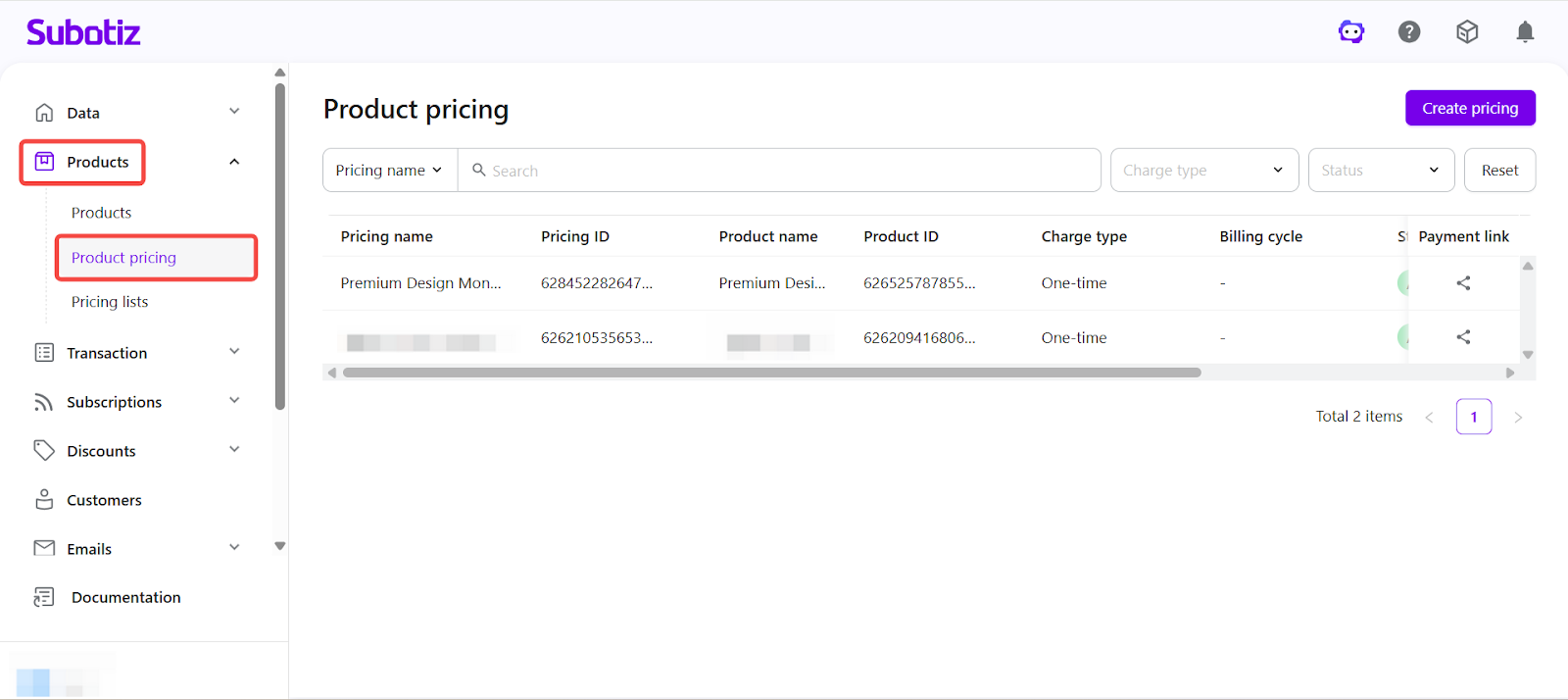
Viewing Product Pricing in the Admin
To access Product Pricing: In the Subotiz admin, go to Product > Product Pricing.
Each Product Pricing entry displays:
- Pricing name
- Pricing ID
- Product name
- Product ID
- Charge type
- Billing cycle
- Status
- Created time
- Currency
- Payment link
From this page, you can:
- Create new Product Pricing.
- Filter by product, pricing name, charge type, or status.
-
View Product Pricing entries and their associated products.
Product Pricing gives you a centralized way to manage how products are billed in Subotiz. By supporting multiple pricing options under one product, you can offer flexible payment models while keeping billing consistent and easy to manage.
Next step: Continue to Understanding Subscription to learn how subscription lifecycles are managed.