The dispute management feature in Subotiz allows merchants to view and manage disputes from Subotiz Payments and PayPal in a centralized dispute management dashboard. Merchants can review dispute reasons, case statuses, and response deadlines, submit evidence according to each payment provider's requirements, and track dispute outcomes to improve handling efficiency.
Understanding Disputes
A payment dispute occurs when a customer challenges a transaction through their bank, card issuer, or payment provider and requests a refund or investigation. Common reasons include unauthorized transactions, products or services not received, duplicate charges, and charges made after a subscription was canceled.
When a dispute is initiated, the payment provider opens a case according to its dispute rules and sets a response deadline. Merchants must submit supporting evidence within the specified timeframe to demonstrate the validity of the transaction or explain how the issue was handled.
If a merchant does not respond by the deadline, the case is automatically decided in favor of the customer. The final outcome is determined by the relevant payment provider or card issuer based on applicable rules and the evidence submitted.
Types of Disputes
Subotiz supports the following 11 dispute reasons to help merchants identify why a customer initiated a dispute. Some reasons apply only to specific payment providers.
- Credit not processed: The customer returned a product, canceled an order, or did not use a service, but did not receive the corresponding refund or credit.
- Duplicate: The same order was charged more than once.
- Unauthorized: The customer states they did not authorize the transaction, which may involve fraud or a payment made without permission.
- Product not received: The customer paid but states they did not receive the purchased product or service.
- Product unacceptable: The customer considers the product or service defective, damaged, or different from its description at the time of purchase.
- Subscription cancelled: The customer was still charged after canceling a subscription.
- Unrecognized (Subotiz Payments only): The customer does not recognize the charge on their bank statement or transaction history.
- Incorrect charge amount (PayPal only): The amount charged does not match the order amount the customer confirmed.
- Payment by other methods (PayPal only): The customer states the transaction was already paid using another payment method.
- Remittance processing error (PayPal only): An error occurred during the money transfer or remittance process.
- Others: Disputes outside the categories above, which require further review of the case details to confirm the reason.
Handling Disputes
After receiving a dispute, merchants can follow these steps to review the case, prepare evidence, and track the outcome.
- Review dispute details: Go to Transaction > Disputes > Dispute management to review the related transaction, dispute reason, disputed amount, and response deadline.
- Gather evidence: Prepare supporting documents based on the dispute reason, such as order confirmations, proof of delivery or service fulfillment, refund records, and customer communications.
-
Submit a response: Submit evidence before the response deadline according to the payment provider's requirements.
- Subotiz Payments: Submit evidence directly in the Subotiz admin.
- PayPal: Go to the PayPal Resolution Center to submit evidence and handle the dispute.
- Track dispute progress: Return to the dispute management dashboard in Subotiz to monitor the case status and outcome.
Note: Submitting evidence does not guarantee a favorable outcome. The final decision is made by the relevant payment provider or card issuer based on applicable rules and the evidence submitted.
Dispute Handling Rules
Merchants should understand the following rules when responding to payment disputes:
- Response deadline: Submit evidence before the specified deadline. Missing the deadline results in the case being automatically decided in favor of the customer.
- Provider decision: Dispute outcomes are determined by the relevant card issuer, bank, or payment provider according to applicable rules.
- Provider-specific handling: Subotiz Payments disputes can be handled directly in the Subotiz admin, while PayPal disputes must be handled through the PayPal Resolution Center.
- Subotiz's role: Subotiz provides centralized dispute management, status tracking, and evidence submission where applicable. Subotiz does not determine dispute outcomes.
Dispute Record Fields
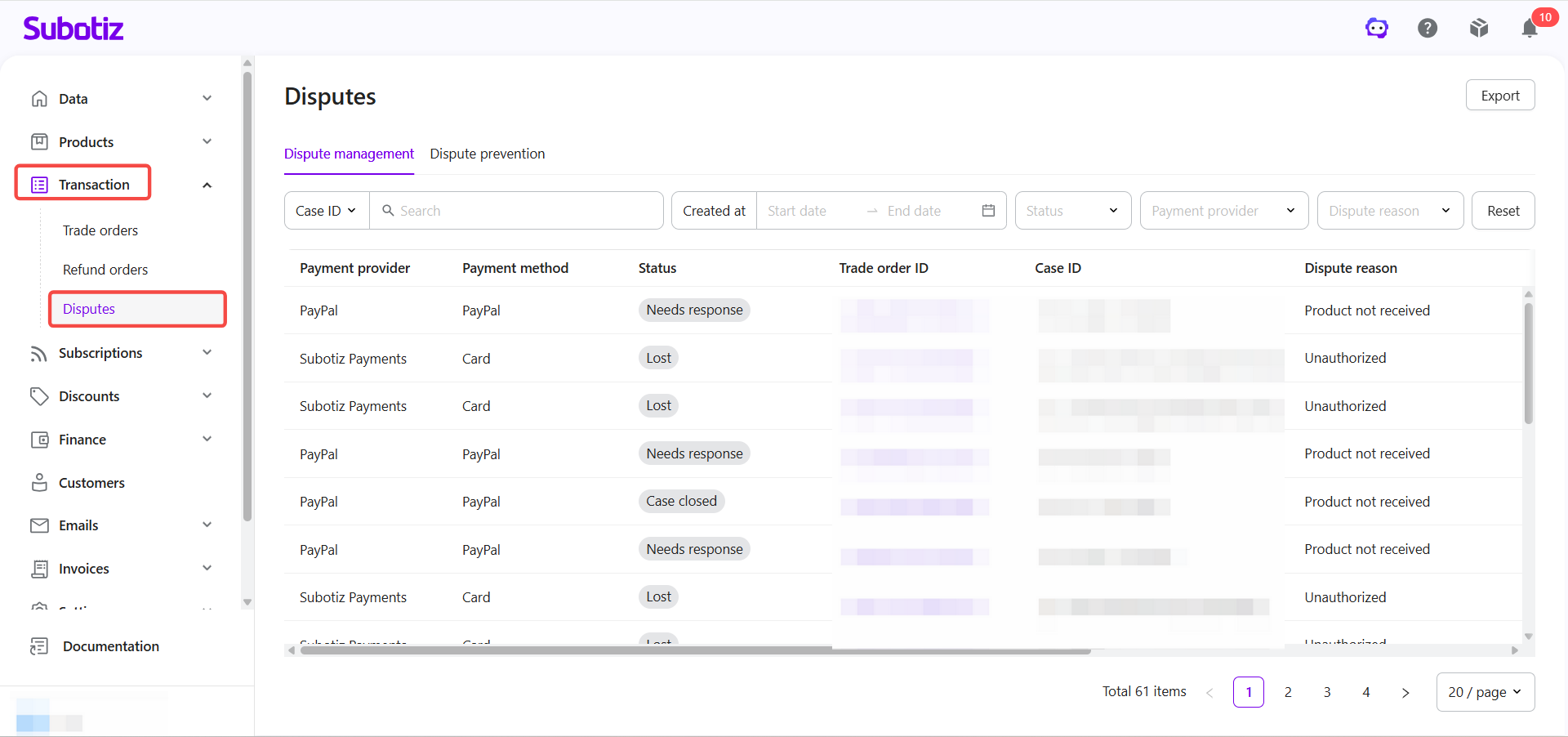
The dispute management dashboard displays key information for each dispute, helping merchants identify related transactions, monitor case statuses, and track response deadlines.
Field |
Description |
|---|---|
Payment provider |
The payment provider handling the dispute, such as Subotiz Payments or PayPal. |
Payment method |
The payment method used for the original transaction, such as Card or PayPal. |
Status |
The current status of the dispute case. |
Trade order ID |
The ID of the original transaction. Click to view the trade order details. |
Case ID |
The case reference number assigned by the payment provider. |
Dispute reason |
The reason provided by the payment provider, such as Unauthorized or Product not received. |
Disputed amount |
The amount under dispute. |
Created at |
The date the dispute case was created. |
Response deadline |
The deadline for submitting a response or evidence. |
Updated at |
The date the dispute case was last updated. |
Viewing Disputes in the Admin
Merchants can view disputes from Subotiz Payments and PayPal in the Subotiz admin and use search and filtering options to locate specific cases.
- Open the dispute management dashboard: Log in to the Subotiz admin and go to Transaction > Disputes > Dispute management.
- Search or filter disputes: Use Case ID, Trade order ID, Created at, Status, Payment provider, or Dispute reason to locate specific dispute records.
- View dispute details: Open a record to review the dispute reason, disputed amount, response deadline, and current status.
- Track dispute outcomes: Monitor case status updates and review the final decision once the payment provider completes its review.
- Export dispute records: Export all dispute records or the current filtered results for internal review and recordkeeping. For detailed instructions, see Disputes|Exporting Disputes.
The dispute management feature in Subotiz helps merchants manage disputes from Subotiz Payments and PayPal in one place, monitor response deadlines, and follow each payment provider's dispute handling requirements to improve operational efficiency.