The Collection feature in Subotiz Accounts lets merchants view cross-border collection records, including review progress, processing status, and settlement results. Use the Collection page to track incoming funds, reconcile transactions, manage funds, and resolve collection-related issues.
What Is a Collection
The Collection feature records all funds received through Global Accounts and displays the review results and processing status for each collection.
After a sender completes a transfer, funds are credited to the corresponding Global Account. Once the review is complete, the system generates a collection record showing the received amount, review result, and processing status.
Collection records reflect actual fund-processing results, making them the authoritative reference for reconciliation, fund management, and troubleshooting.
How Collection Works with Global Accounts
Global Accounts receive and hold cross-border funds, while the Collection feature records what happens after funds arrive.
Every collection record is linked to a specific Global Account. Review progress, settlement results, and final processing status are all visible from the Collection page. Once a collection is processed successfully, funds are credited to the balance of the corresponding Global Account.
Collection Processing Flow
A collection typically goes through the following process:
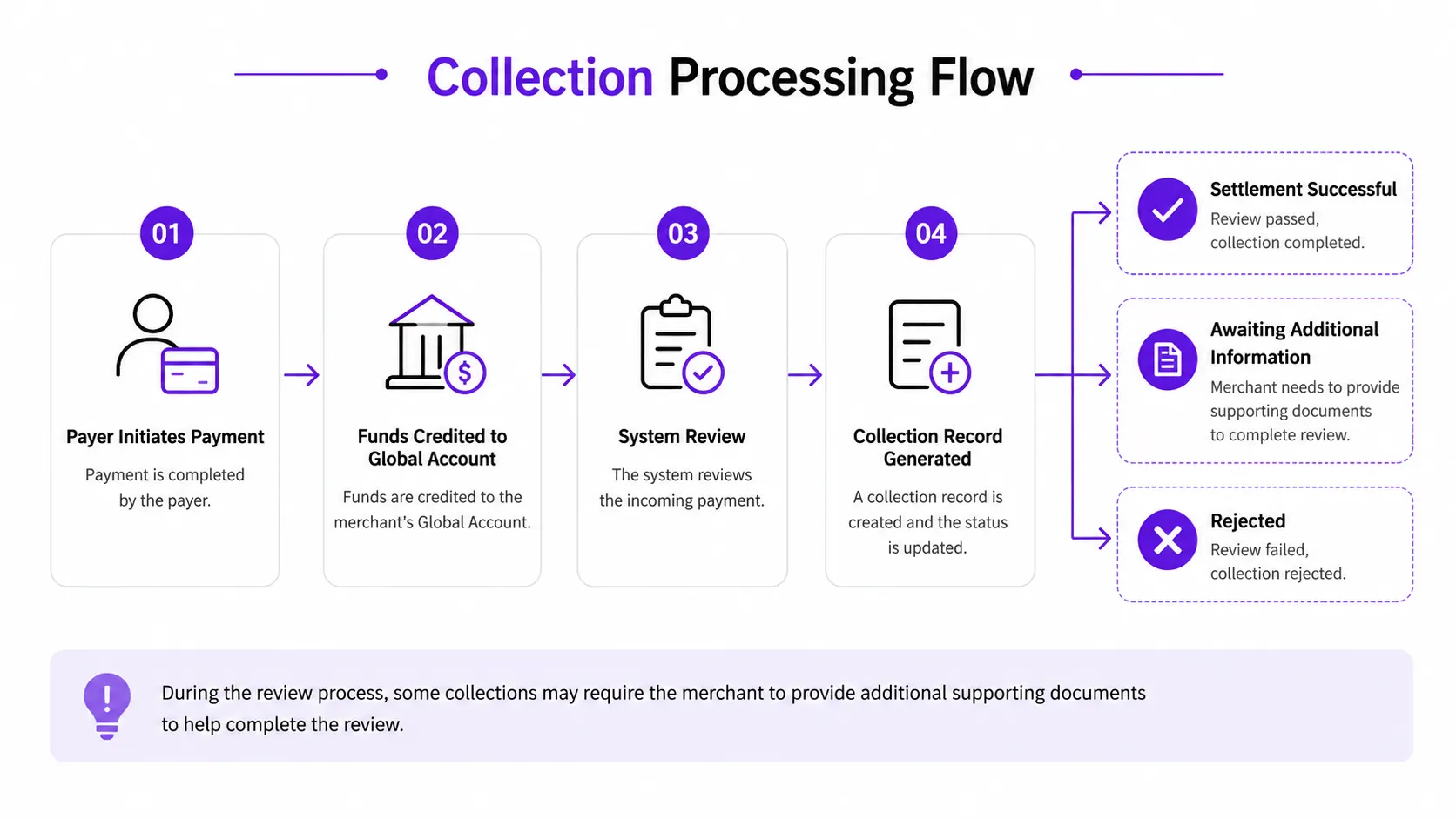
Based on the review outcome, a collection record shows one of the following statuses:
Status | Description |
|---|---|
Success | The collection has been processed successfully, and funds have been credited to the corresponding currency balance. |
Processing | The collection is under review and awaiting completion. |
Documents Required | Supporting documents must be uploaded before the review can continue. |
Rejected | The collection did not pass review and funds will be returned to the sender. |
Information Included in a Collection Record
The Collection page shows key details for each collection:
- Creation date and time
- Collection order number
- Associated Global Account
- Collection status
- Received amount
- Settlement amount
Open the collection details page to view remittance information, settlement details, and review results.
Actions Available on the Collection Page
After a collection record is created, the following actions are available:
- View collection records: Check the processing status and settlement information for each collection.
- View collection details: Access remittance information, review results, and related records.
- Submit supporting documents: If a collection shows a Documents Required status, upload the requested files as prompted.
- Confirm review results: View the final processing status and settled amount for a collection.
Next Steps After Funds Are Credited
Once a collection has been processed successfully, funds are credited to the corresponding currency balance and can be used based on business needs:
- Foreign exchange conversion: Convert balances to other supported currencies.
- Global payouts: Use the available balance to pay overseas suppliers, partners, or service providers.
- RMB settlement: Settle eligible funds into Chinese yuan.
Important Notes
- Collection records only reflect funds that have entered the processing pipeline.
- Review procedures may vary depending on the collection scenario.
- Some collections require additional supporting documents before the review can continue.
- The dashboard displays the authoritative review outcome and settlement details.
The Collection feature provides a centralized view of inbound cross-border collection records, including review status, processing progress, and settlement results. Each collection record is linked to its corresponding Global Account, making it easier to reconcile funds, track collection progress, and investigate issues.