Integration Settings provides the API credentials and payment redirect settings required to connect a website, app, or other business system to Subotiz. Merchants can retrieve API keys and the Access No. for system integration and configure the URLs customers are redirected to after completing or canceling a payment.
Integration Settings includes two modules:
Module |
Key Functions |
Use Case |
|---|---|---|
API Keys |
View Standard key and Access No. |
API authentication and system integration |
Redirects |
Configure Return URL and Cancel URL |
Redirect customers after a successful or canceled payment |
API Keys
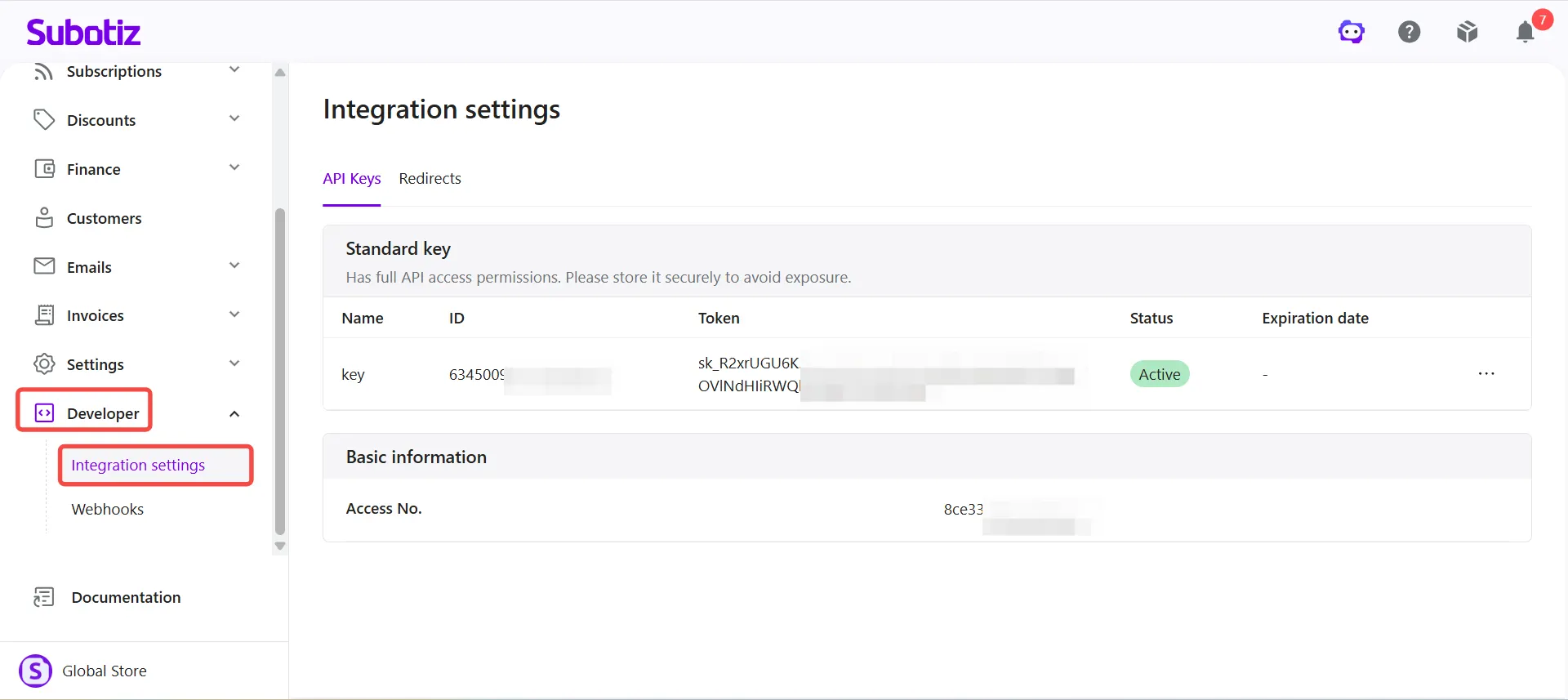
The API Keys tab provides the credentials required for API authentication and system integration. When connecting a website, app, or other business system to the Subotiz API, retrieve the required credentials from this page.
The API Keys tab includes Standard key and Basic information sections.
Standard key
If a Standard key is available for the account, the following information is displayed:
- Name: The name assigned to the Standard key.
- ID: The unique identifier for the Standard key.
- Token: The credential used to access the Subotiz API.
- Status: The current status of the Standard key.
- Expiration date: The expiration date of the Standard key.
Standard keys provide full API access. Store them securely and never expose them publicly.
Note: Standard key availability varies by account. Refer to the API Keys tab for the information available to the current account.
Basic information
The Basic information section displays the Access No. for the current account. Refer to the applicable API documentation when using the Access No. for system integration.
For more information about API keys, see Integration Settings | Viewing and Rotating API Keys.
Redirects
The Redirects tab determines where customers are redirected after completing or canceling a payment. Configure the Return URL and Cancel URL based on the merchant's payment flow.
- Return URL: The URL customers are redirected to after a successful payment, such as an order confirmation or payment success page.
- Cancel URL: The URL customers are redirected to after canceling a payment, such as the checkout page or another designated page.
Configuring these URLs directs customers from the Subotiz payment flow back to the merchant's website or application, creating a seamless checkout and post-payment experience.
For configuration instructions, see Integration Settings | Configuring Return and Cancel URLs for Payment Links.
Security Recommendations
- Protect the Standard key: Never expose the token in front-end code, public documentation, screenshots, or messaging tools.
- Restrict credential access: Limit access to Integration Settings credentials to trusted technical staff responsible for system integration.
- Store credentials securely: Keep sensitive credentials in a secure server environment or dedicated secrets management tool.
Accessing Integration Settings
- Open Integration Settings: Log in to the Subotiz admin and go to Developer > Integration Settings.
Integration Settings provides the API credentials required to connect external systems to Subotiz and the redirect settings needed to manage the post-payment customer experience. API Keys support secure system integration, while Redirects route customers back to the merchant's designated pages after payment.