Changing a subscription allows merchants to switch the pricing plan associated with an active subscription, such as upgrading to a higher-tier plan or downgrading to a lower-tier option, without interrupting the existing subscription contract. Subscription changes are supported for both recurring and fixed-term subscriptions. Available options may vary depending on the current subscription status and the actions displayed in the admin.
Subotiz supports subscription changes for the following pricing models:
- Flat price
- Package pricing (recurring billing or customer-initiated payment)
- Based on usage
The system automatically updates the subscription plan and processes related billing adjustments based on the selected effective timing and proration behavior.
Accessing the Change Entry
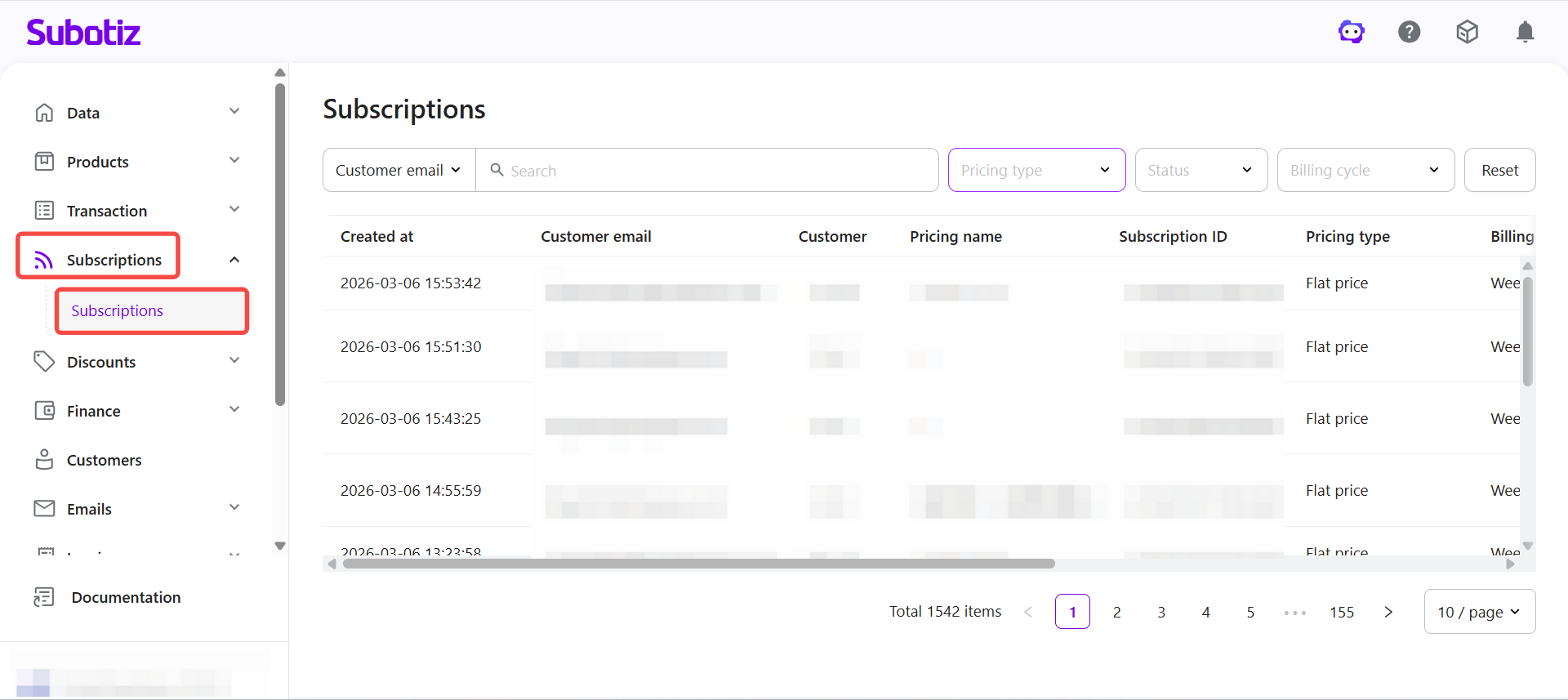
- Open subscriptions: Log in to Subotiz Admin, then go to Subscriptions > Subscriptions to view all active and historical subscriptions.
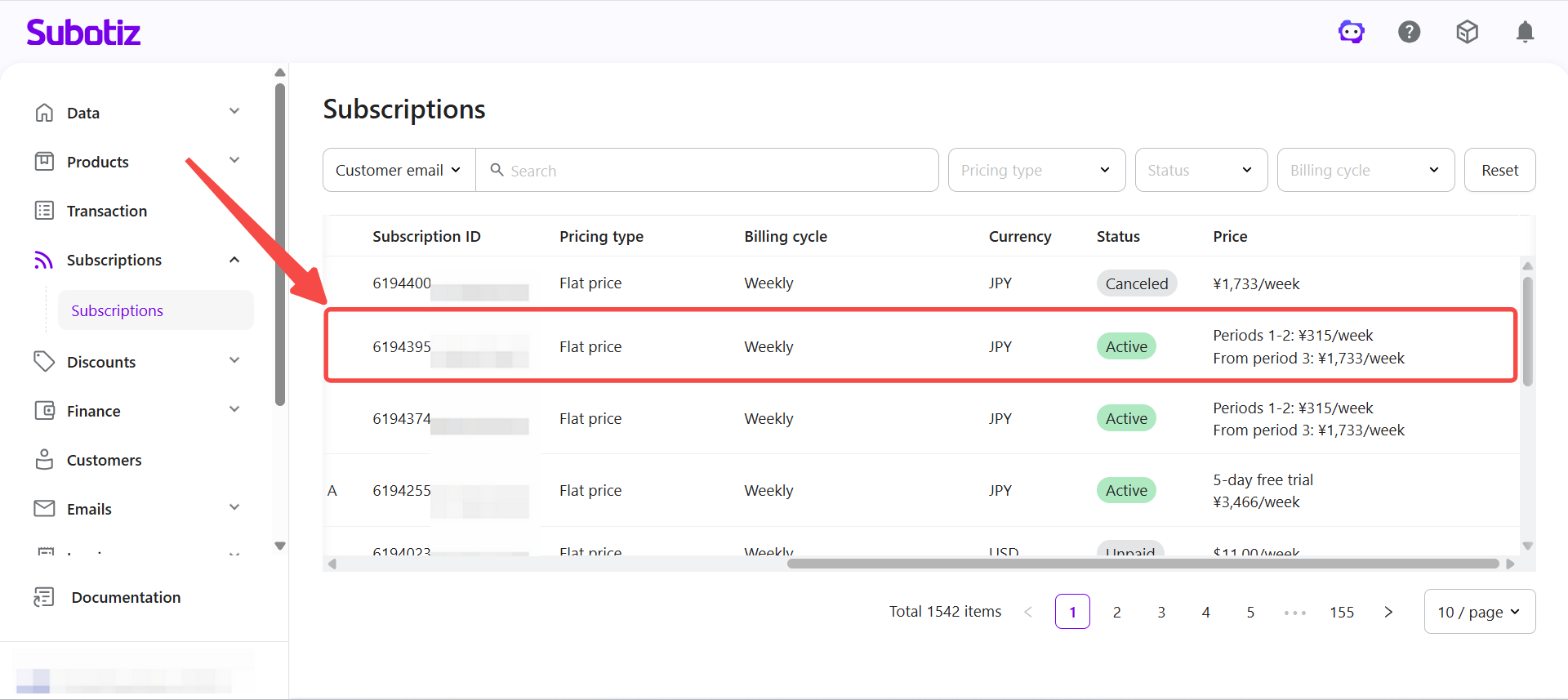
- Locate the subscription: Find the subscription you want to change in the list and open the Subscription Details page.
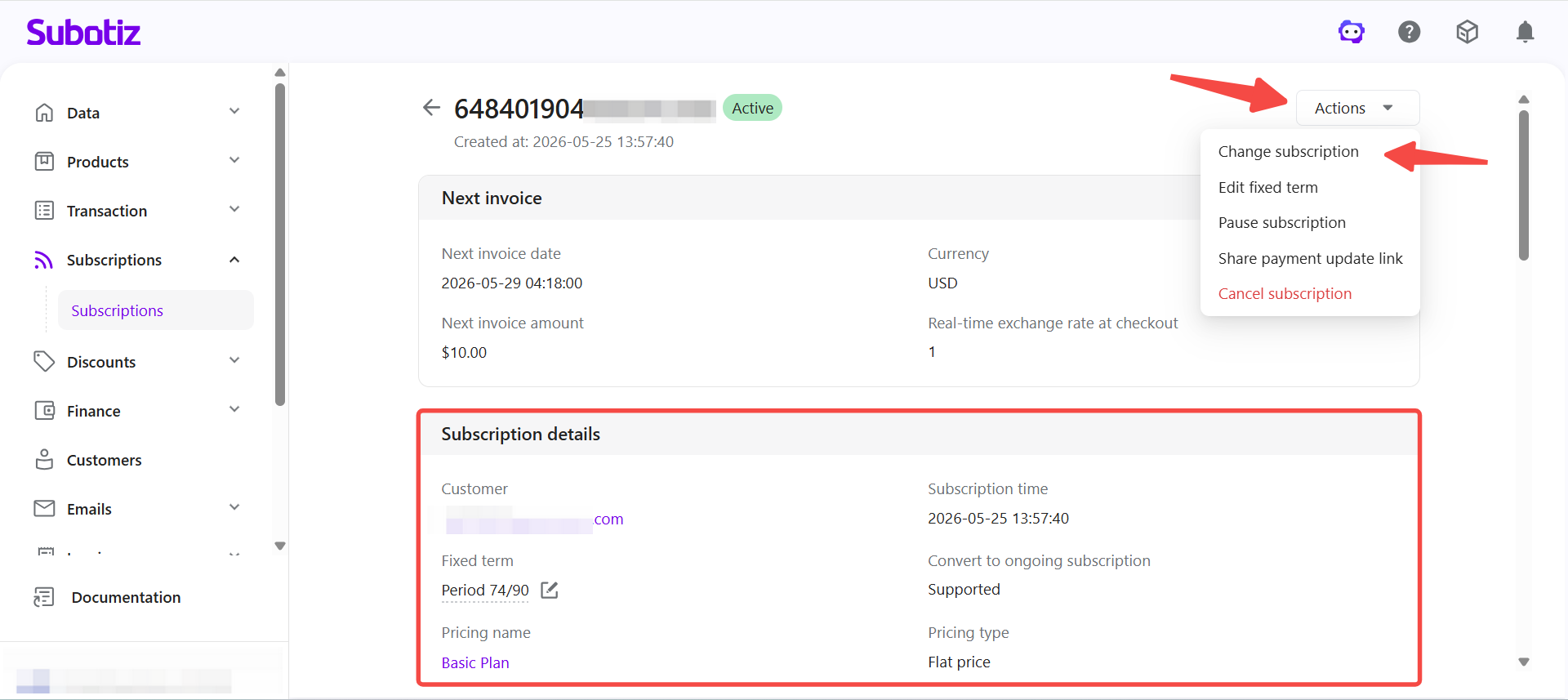
- Start the change: On the Subscription details page, click Actions > Change subscription in the upper-right corner. Before proceeding, review the subscription details carefully.
- Open the change window: The Change subscription dialog appears. In this dialog, you can select:
- A new product
- A new pricing plan
- The effective time
- The proration settings
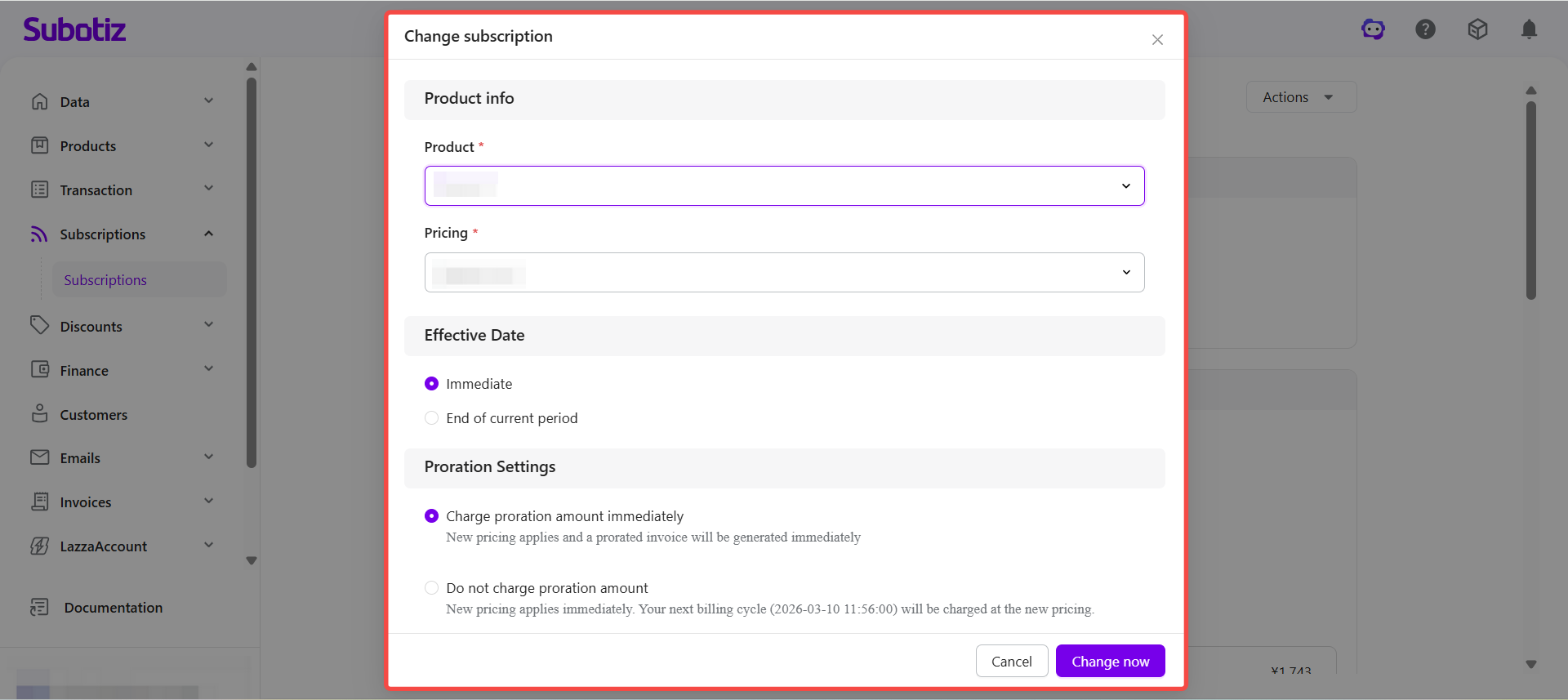
- Submit the change: After confirming the information is correct, click Change now to apply the update.
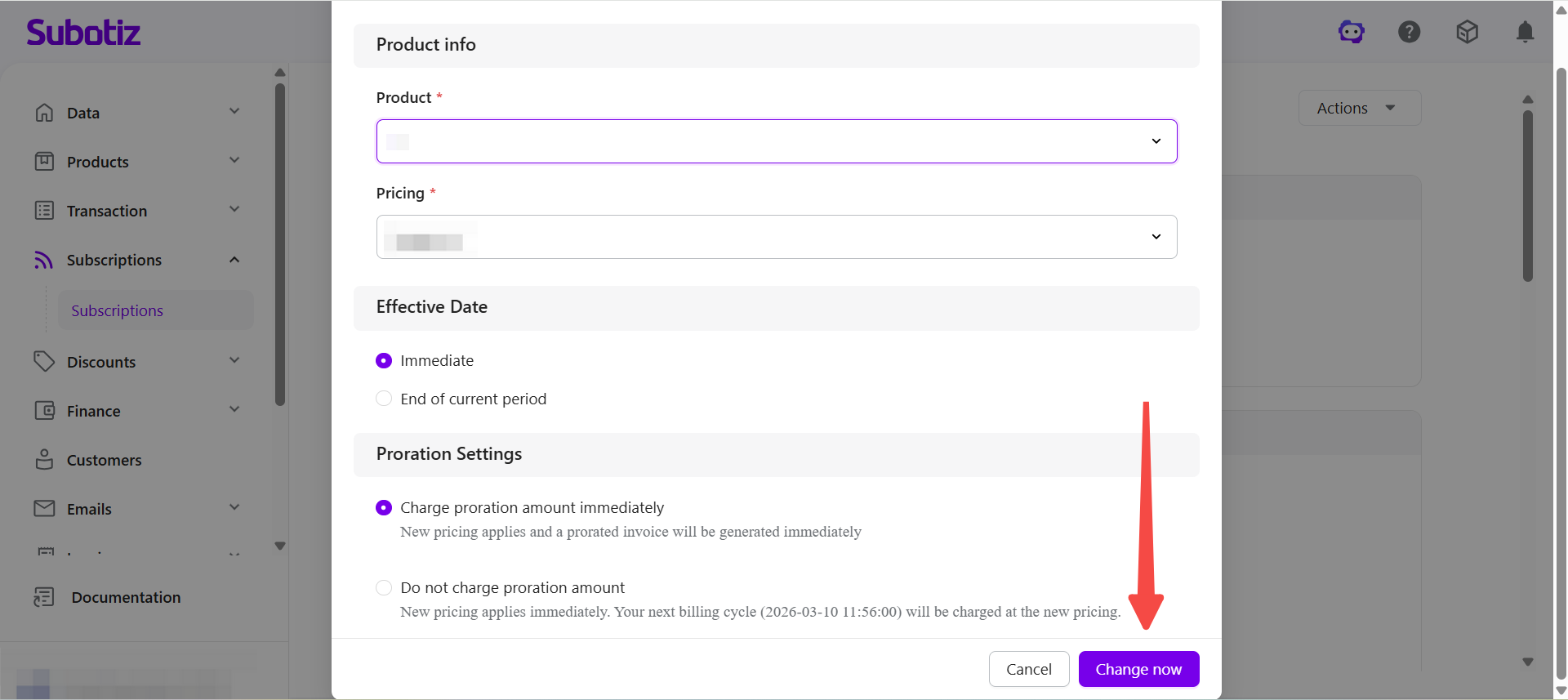
Setting the Effective Time
When changing a subscription, Subotiz supports two timing options for when the change takes effect.
- Immediate effect: The new pricing plan is applied immediately.Depending on the subscription status, pricing type, and proration settings, the system may automatically:
- Charge the new plan price
- Refund the unused value of the current plan
- Process both a refund and a new charge
- Apply the change without any billing adjustment
The exact billing result is displayed in the confirmation dialog before the change is finalized.
- End of current period: The current billing cycle continues using the existing pricing plan. The new pricing plan will take effect once the current cycle ends.In most cases, this option does not trigger immediate billing adjustments. The new pricing will apply starting from the next billing cycle.For Package price plans using customer-initiated payment, the new pricing will apply the next time the customer initiates a payment.
Proration Rules
When Immediate effect is selected, the system calculates billing adjustments based on the selected proration option.
- Charge proration amount immediately: The system calculates the price difference based on the remaining time in the current billing cycle and automatically generates:
- An invoice if additional payment is required
- A refund record if the customer should receive a refund
- Do not charge proration amount: The new pricing plan takes effect immediately, but no proration calculation or billing adjustment is performed.Depending on the subscription state, the system may:
- Apply the new plan without billing changes
- Charge the full amount of the new plan directly
Trial Period Scenarios
If the subscription is currently in a trial period, billing behavior may differ.
- Paid trial: If the subscription is in a paid trial, the system may refund the remaining trial amount and recalculate charges based on the new pricing plan.
- Free trial: If the subscription is in a free trial, the system may either:
- Charge the new plan immediately, or
- Start a new trial period under the new pricing plan
The system will display the exact billing behavior before the change is submitted.
Fixed-Term Subscription Notes
Fixed-term subscriptions also support subscription changes.
After a subscription change, the system:
- Updates the subscription contract based on the new pricing plan
- Processes the subscription change and related billing adjustments according to the selected effective timing
- Preserves the existing fixed-term configuration
If the fixed term also needs to be adjusted, use the Modify Fixed Term feature separately.
Note:
System Behavior After Submission
After the change is submitted, the system automatically performs the following actions:
- Updates the pricing plan in the subscription contract
- Records the change time and operator
- Generates invoices or refund records when required
- Stores pending subscription changes if End of current period is selected
After processing, a confirmation dialog displays the result of the change, such as:
- No billing adjustment required
- The price difference will be charged using the original payment method
- Refunds will be returned to the original payment method
- The new pricing plan takes effect immediately with a trial period
If the change fails, the system will display the reason.
Best Practices
- Use Immediate effect when customers need immediate access to new features or higher-tier plans.
- Use End of current period when you want to avoid mid-cycle billing adjustments.
- Review before submitting to ensure the correct product, pricing plan, and proration option are selected.
Based on the selected effective timing, pricing model, and subscription status, Subotiz automatically processes related billing adjustments and updates the subscription contract and associated records.