In this tutorial, we'll learn about a back-end embedded checkout flow and a step-by-step integration process, including initiating Subotiz.js, passing settings and items, and updating on-page information.
Checkout flow
- When a customer is ready to complete a purchase, a checkout request is initiated from your client-side application to your server. Your server should use the Subotiz API to create a Checkout Session, passing your platform's unique business identifier (
order_id) as a parameter during creation. Thisorder_idis crucial for subsequently correlating the trade order. - The Checkout Session provides a Session ID. Your client-side application can then use the SDK to invoke and display the Subotiz payment form to the customer.
- The customer enters their payment information into the Subotiz form and completes the transaction.
- Upon transaction completion, Subotiz will send a notification to your server via a webhook. This notification includes a payment success event, which contains the
order_idoriginally passed during the session creation. This allows you to correlate your platform's order with Subotiz's trade order.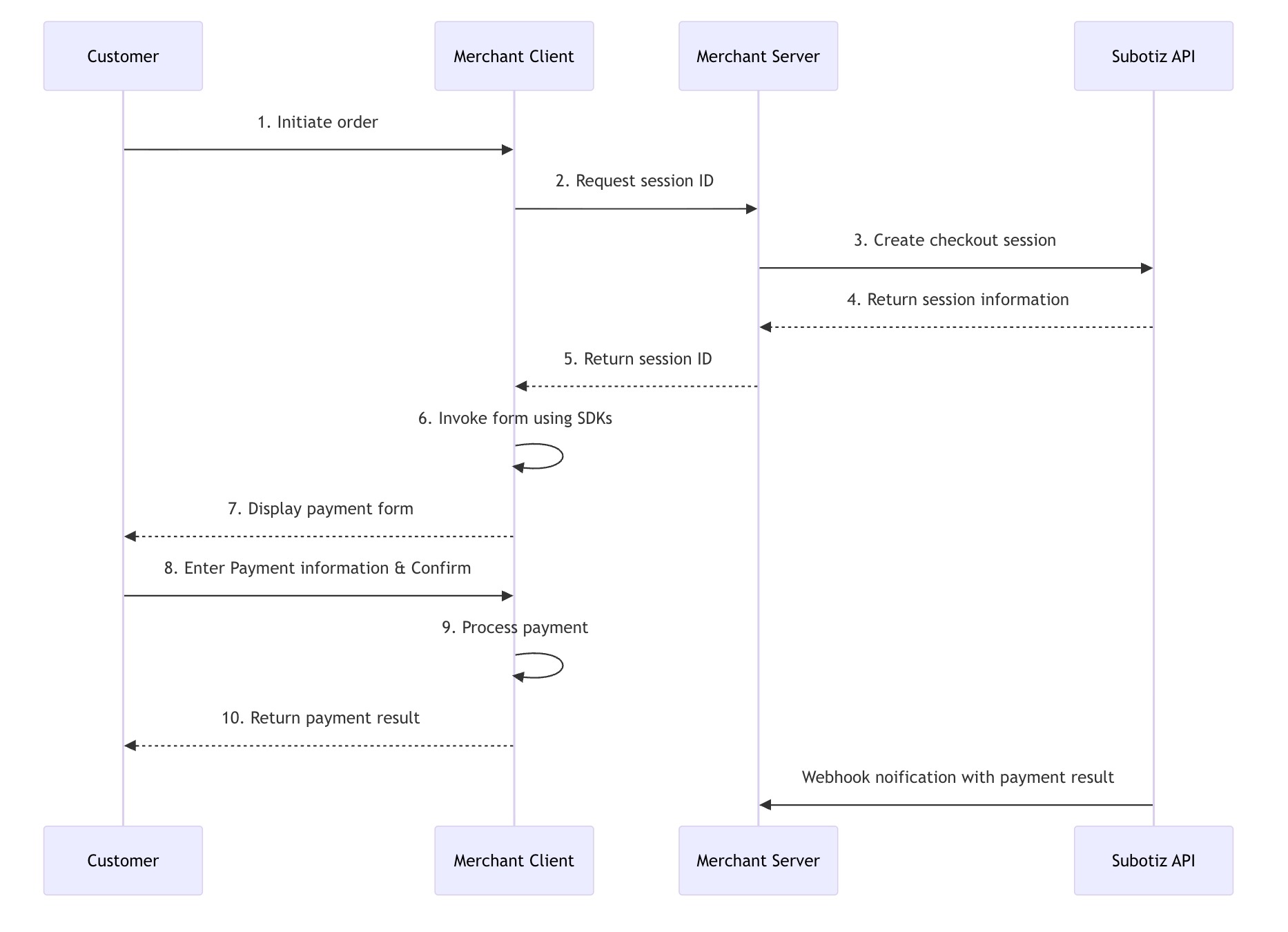
Before you begin
Create products and prices
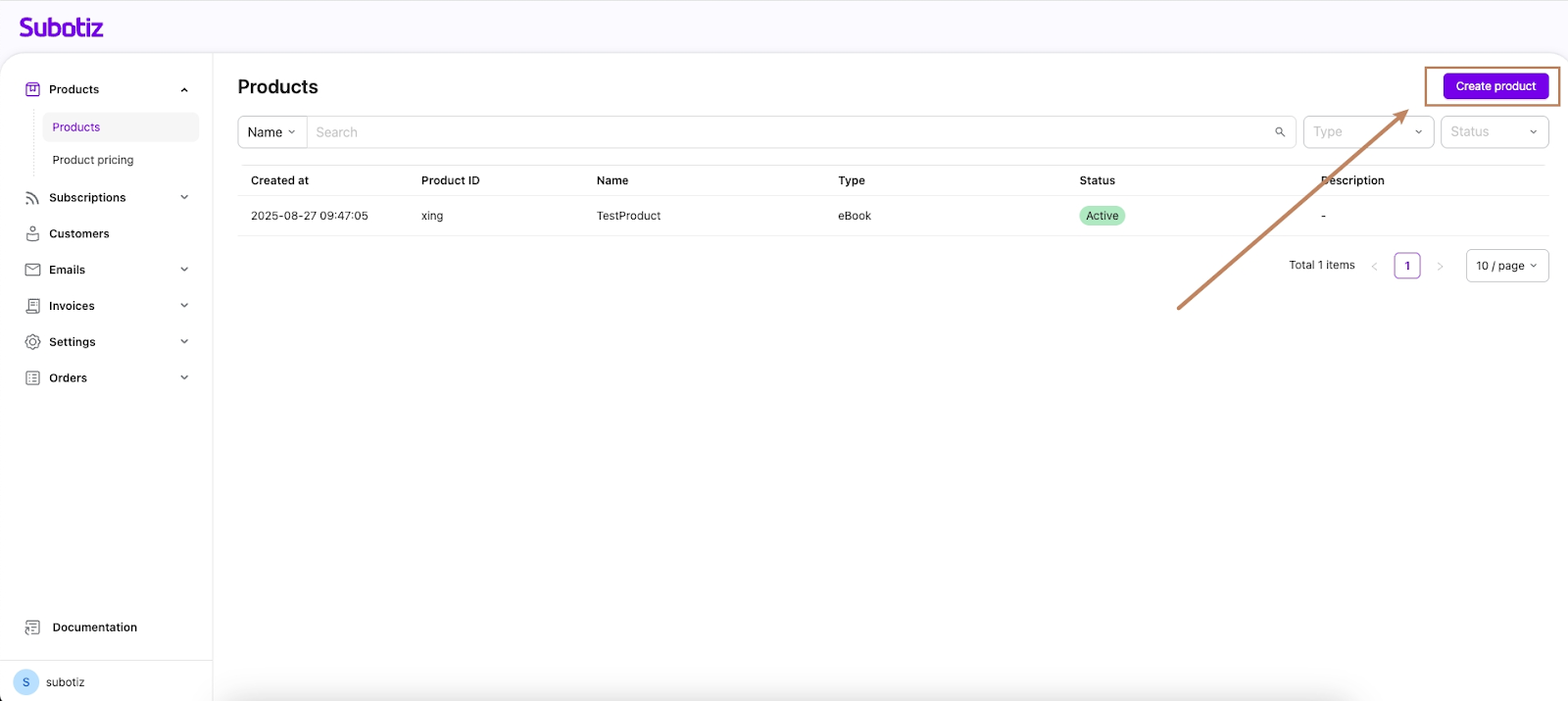
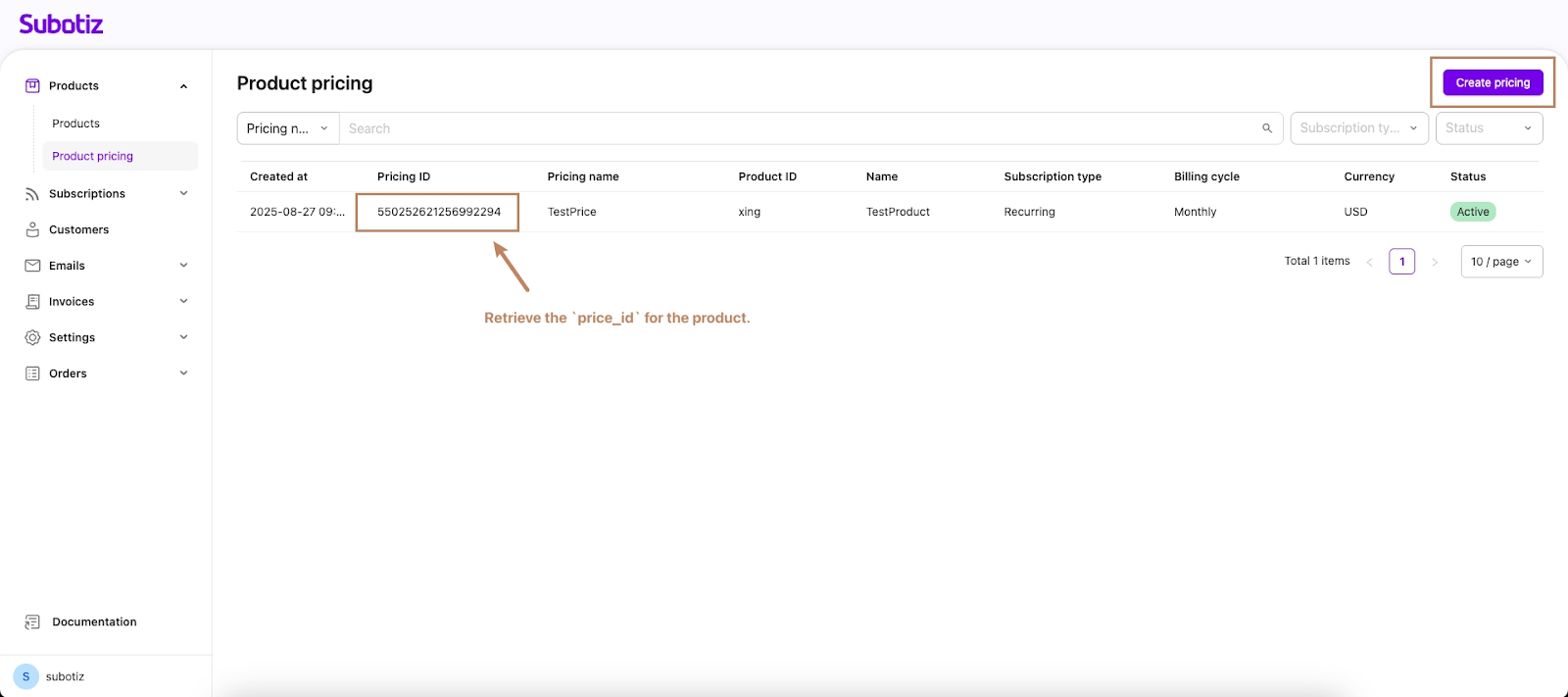
Subotiz provides the platform to create products and product pricing, whose information will be saved on the Server. However, the checkout session works with the
pricing_id of product pricing to dynamically obtain the product information, so you'll need to create a product and at least one related product pricing to pass to your checkout.- Create a product:
- Create product pricing:
Provide a payment success page
- Your application needs to provide a publicly accessible page (Return URL) to display after a successful payment. After the customer completes the payment, Subotiz will redirect them to this page.
-
Meanwhile, merchants can also customize the success workflow as they want. A callback function will be automatically triggered only when
redirect_on_completionis set toif_requiredduring Checkout Session creation. Subotiz will call back this function to allow merchants to customize their own success workflow. In this way, customers can enter a success page without automatic redirection.
Provide a Webhook endpoint
Create an endpoint to receive events for your account. When an event occurs, Subotiz will send an HTTPS POST request containing a JSON-formatted event object to this Webhook endpoint. You can use these events to keep your system's business data in sync.
Integration process
Your client-side application can use the Subotiz SDK to integrate Subotiz Checkout.
Load Subotiz.js
<script src="https://checkout.subotiz.com/static/subotiz/v0/subotiz.js"></script>Provide a container node
<div id="your_domElement"><!-- The checkout page will be displayed here --></div>Create checkout session
Use the Subotiz API to create a Checkout Session, and return the response to your frontend.
- Example 1: Creating a checkout session with products
curl --location 'https://api.subotiz.com/api/v1/session' \
--header 'Content-Type: application/json' \
--header 'Hub-Timestamp: 1755695704350' \
--header 'Hub-Access-No: 77d52a21dc032b4' \
--header 'Request-Id: dd7fb126-be31-4144-a1af-e4bf4203eb92' \
--header 'Hub-Signature: 4830f629ff065be043c4f4b2f908ef6418d18e4ef9d6a288313ded21f1b0ec13' \
--data-raw '{
        "access_no":       "77d52a21dc032b4",
        "sub_merchant_id": "2816433",
        "order_id":        "123e4567-e89b-12-a456-426622201a",
        "payer_id": "customer_id_001",
        "customer_id":     "",
        "email":           "zhangsan@subotiz.com",
        "line_items": [                        # Product info (required for checkout mode)
            {
                "price_id": "543321366326164797",
                "quantity": "1"
            }
        ],
        "return_url":   "https://www.subotiz.com",
        "cancel_url":   "https://www.subotiz.com",
        "callback_url": "https://webhook.site/2c889bcb-9923-4551-909a-d827f1c326e3",
        "mode": "checkout",      # Choose 'checkout' mode when product data is present
        "integration_method": "embedded",   # Select embedded integration
        "redirect_on_completion": "if_required" # Choose redirection behavior based on business needs; this example redirects only when necessary
    }'
Key parameters:
order_id: Your platform's internal order ID, used for subsequent business data correlation.integration_method: Set toembeddedto use the embedded form integration method.return_url: The URL the customer is redirected to after a successful payment.mode: Choosecheckoutmode when product data is present.
- Example 2: Creating a checkout session without products/pricing
curl --location 'https://api.subotiz.com/api/v1/session' \
--header 'Content-Type: application/json' \
--header 'Hub-Timestamp: 1755695704350' \
--header 'Hub-Access-No: 77d52a21dc032b4' \
--header 'Request-Id: dd7fb126-be31-4144-a1af-e4bf4203eb92' \
--header 'Hub-Signature: 4830f629ff065be043c4f4b2f908ef6418d18e4ef9d6a288313ded21f1b0ec13' \
--data-raw '{
        "access_no":       "77d52a21dc032b4",
        "sub_merchant_id": "2816433",
        "order_id":        "123e4567-e89b-12-a456-426622201a",
        "payer_id": "customer_id_001",
        "customer_id":     "",
        "email":           "zhangsan@subotiz.com",
        "return_url":   "https://www.subotiz.com",
        "cancel_url":   "https://www.subotiz.com",
        "callback_url": "https://webhook.site/2c889bcb-9923-4551-909a-d827f1c326e3",
        "mode": "payment",            # Select payment mode when no product data is present
        "total_amount": "10",         # Amount to collect (required for payment mode)
        "integration_method": "embedded",    # Choose embedded integration
        "redirect_on_completion": "if_required" # Configure redirection behavior; this example only redirects when necessary
    }'
Initialize the checkout page
// After importing via the script tag, Subotiz is automatically attached to the window object
const { Subotiz } = window;

// Create an SDK instance
const subotiz = Subotiz();

// Initialize checkout
const checkout = await subotiz.initEmbeddedCheckout({
  fetchSessionId: async () => {
    // Fetch the sessionId from your server
    const response = await fetch('/api/session');
    const data = await response.json();
    return data.sessionId;
  },
  environment: 'TEST', // 'TEST' | 'PRODUCTION'
  // The callback function when the payment completed only triggers when `redirect_on_completion`  is set to `if_required` during Checkout session creation
  onComplete: () => {
    console.log('Payment completed!');
  }
});

// Mount to the page
checkout.mount('#your_domElement');
Follow these guides above to integrate Subotiz embedded checkout to get your payments online for your digital products and services. It reduces abandonment by eliminating redirects and provides full control over the customer experience, turning payments into a competitive advantage.