The Balance Center is the central hub for fund management in Subotiz, displaying the current status and transaction history of available balance, pending balance, and reserved fund. From here, merchants can review fund structure, track settlement progress, reconcile transactions, and navigate directly to pending balance, reserve fund, and reconciliation report pages.
Balance Structure
The Balance Center organizes funds into three categories, each reflecting a different stage in the settlement process.
- Available balance: Funds that have completed settlement and are ready for withdrawal or other financial operations. This amount updates after each settlement cycle and may be affected by refunds, fees, reserve releases, or adjustments.
- Pending balance: Funds received from customers that are still within the settlement period, for example T+7. These amounts are not included in the available balance until the settlement cycle completes.
- Reserved fund: Funds held under risk management rules. Reserved amounts are not available during the hold period. Two types apply:
- Rolling reserve: A percentage of each transaction is held per cycle and released automatically once the period ends.
- Fixed reserve: A set amount held for accounts subject to long-term risk controls.
Tracking Fund Flow
- Review incoming funds: Customer payments are recorded in the pending balance immediately after payment completes.
- Apply deductions: The system deducts transaction fees and allocates reserve amounts based on account configuration.
- Complete settlement: When the settlement period ends, the net amount transfers to the available balance.
- Handle adjustments: Refunds, chargebacks, or manual adjustments reduce either the pending or available balance depending on when they occur.
Viewing Transaction Records
- Filter records: Use the date range and transaction type filters to narrow results.
- Search by transaction ID: Enter a transaction ID to locate a specific record directly.
- Review balance changes: The transaction amount and balance fields show the account balance after each operation.
- Read descriptions: The description field identifies the nature of each entry, such as settlement, refund, or adjustment.
- Open transaction details: Click the view icon to access the full breakdown and amount calculation for any record.
Accessing the Balance Center
- Open the Balance page: Go to Finance > Balance to view the balance summary and full transaction table.
- View pending balance details: Click Pending balance to see funds currently in the settlement process.
- View reserved fund details: Select Reserved fund to see held amounts and release schedules.
- Open reconciliation report: Use View reconciliation reports to access periodic summaries and export options.
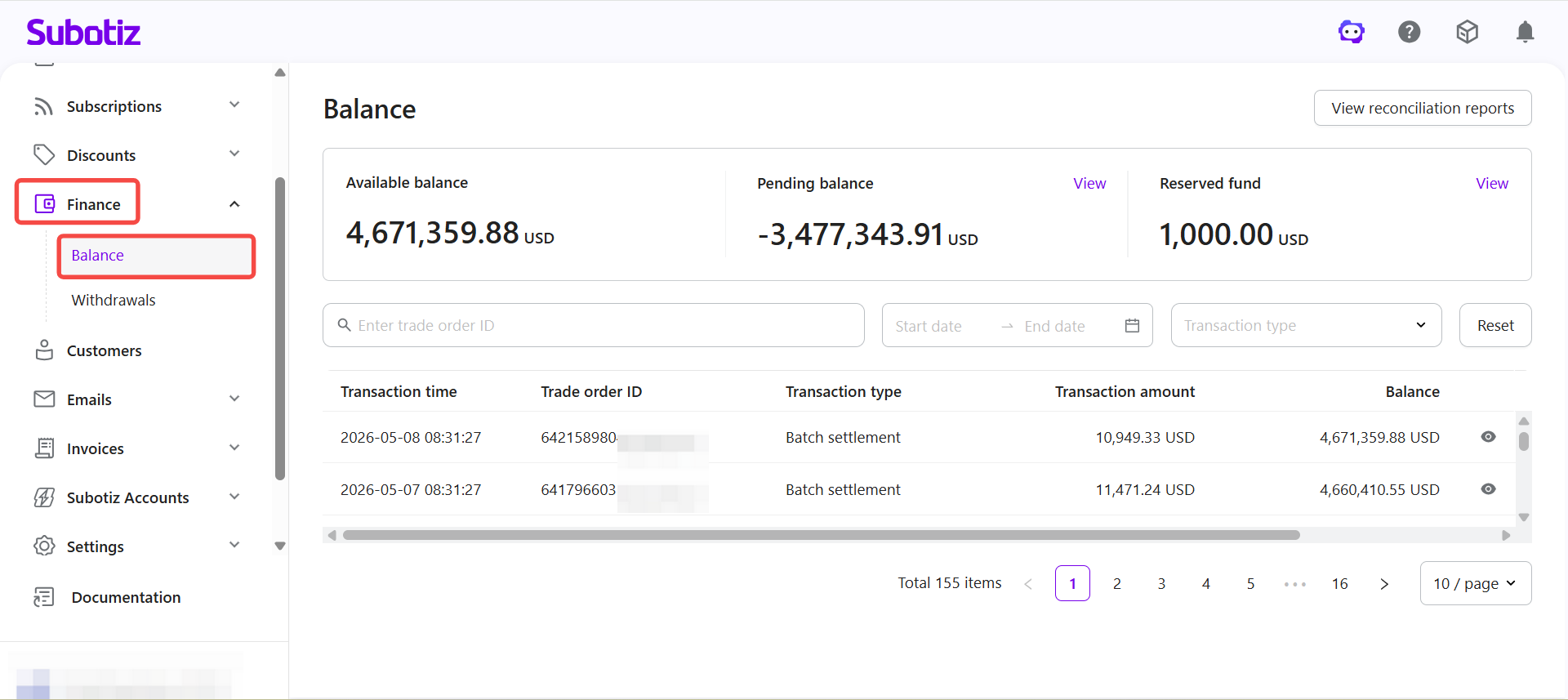
The Balance Center displays available balance, pending balance, and reserve fund data in one place. Transaction records update in real time and can be filtered by date range, transaction type, or transaction ID. Use the reconciliation report to verify fund movements against external accounting records.