The Subotiz Withdrawals module is built on a standardized set of withdrawal statuses and provides merchants with a clear and traceable view of fund transfer records on the Withdrawals page. This allows merchants to understand withdrawal progress, support day-to-day reconciliation, and manage funds with confidence.
Business Value
Withdrawals represent a critical step in moving funds from platform balances to the merchant side. Through the Withdrawals page, merchants can:
- Track withdrawal progress and clearly understand the current processing stage of each request.
- Verify withdrawal amounts and any related fees to confirm balance deductions.
- Review fund transfer records for reconciliation, record-keeping, and financial audits.
- Improve fund visibility and reduce manual status checks.
Withdrawal Status Definitions
The following statuses describe the platform-side processing progress of a withdrawal:
- Pending: The withdrawal has been triggered, a withdrawal record has been created, and the corresponding amount has been deducted from the available balance. The request is awaiting further processing.
- Processing: The withdrawal has entered the scheduled processing flow, and the status will be updated on the transfer date.
- Paid: The platform has completed the fund transfer process for this withdrawal. The platform-side workflow is complete.
Page Fields
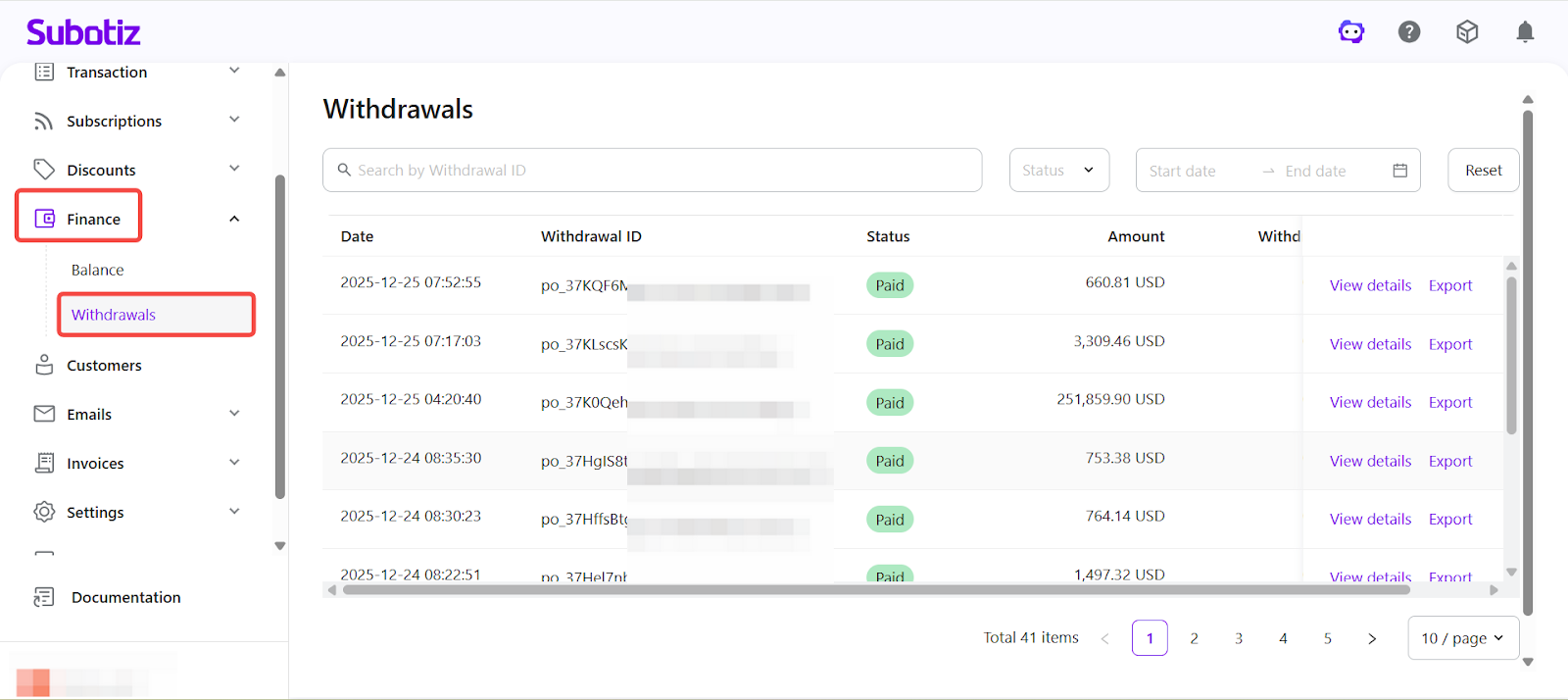
Each withdrawal record displays the following key fields:
- Date: The time when the withdrawal record was created.
- Withdrawal ID: A system-generated unique identifier used for tracking and reconciliation.
- Status: The current processing status of the withdrawal (Pending / Processing / Paid).
- Amount: The withdrawal amount associated with the record.
- Withdrawal Fee: Any applicable fee associated with the withdrawal (if applicable).
- Actions:
- View details: Open detailed information for the selected withdrawal.
- Export: Download withdrawal records for reconciliation or financial analysis.
Withdrawal Details
Click View details to review the full information for a specific withdrawal, including:
- Withdrawal amount
- Initiated time
- Completion time (if paid)
- Withdrawal ID
- Current status
- Additional remarks (if available)
This information is provided for record verification and reconciliation purposes and does not serve as bank confirmation or proof of receipt.
Viewing Withdrawal Records
To access withdrawal records, log in to the Subotiz admin and navigate to Finance > Withdrawals. The page displays all withdrawal records in chronological order, along with their amounts, statuses, and available actions.
From this page, merchants can:
- View all historical withdrawal records.
- Filter withdrawals by status.
- Review individual withdrawal details.
- Export withdrawal records for reconciliation and financial analysis.
The Subotiz Withdrawals module provides a standardized, transparent view of fund transfer records based on consistent status definitions. By offering clear visibility into withdrawal progress and detailed record access, the module helps merchants streamline reconciliation, plan cash flow, and maintain accurate financial records with confidence.