The Price Lists (Pricing Table) feature in Subotiz enables merchants to consolidate multiple pricing plans into a single display page, shareable through a unified checkout link or embedded across channels. This allows merchants to present multiple offers in one place while streamlining checkout and improving conversion efficiency.
Core Capabilities
- Centralize pricing plans: Display multiple billing options (such as weekly, monthly, or one-time payments) on a single page to simplify customer selection.
- Create price lists: Combine existing pricing plans into one list, with configurable name, title, and description.
- Customize display: Adjust button styles, typography, and layout to align with your brand identity.
- Manage price lists: Activate, archive, or delete lists without recreating products or pricing plans.
- Distribute across channels: Share via a URL or embed using iframe code on websites, emails, or social platforms.
Key Benefits
- Simplify checkout access: Provide a single link that presents multiple pricing options without additional navigation.
- Improve conversion rates: Enable side-by-side comparison of plans to reduce decision friction and increase purchase likelihood.
- Streamline pricing management: Organize multiple pricing strategies under the same product without duplication.
Use Cases
- Present subscription options: Offer monthly, yearly, or one-time plans in a unified view to increase conversion.
- Embed into marketing pages: Integrate price lists into landing pages or websites to shorten the decision path.
- Centralize traffic conversion: Share one link across social media or communities to drive direct checkout.
Limitations
- Only Active pricing plans can be added to a price list.
- The following pricing types are supported:
- One-time payment
- Recurring subscription (Fixed Pricing)
- Package Pricing and Usage-based pricing are not supported in price lists.
- Price lists are for display and distribution only and do not modify the original pricing configurations.
Accessing the Price List Page
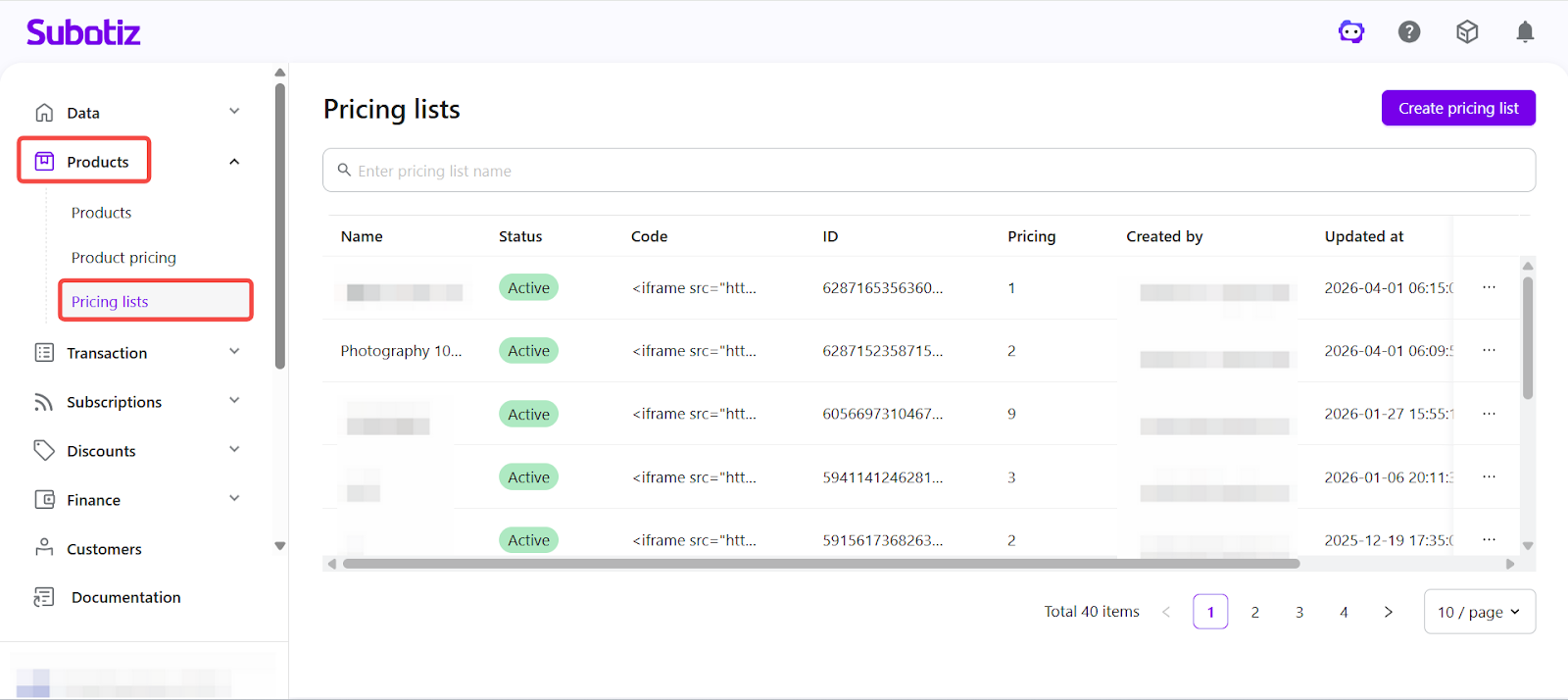
Open the price list dashboard: Go to Products > Price list in the Subotiz admin. The page displays all created price lists, including key details such as name, status, code, ID, number of linked pricing plans, and timestamps.
From this page, you can:
- Create a price list: Click Create price list and select the pricing plans to include.
- Filter price lists: Use name or status filters to locate specific lists.
- View plan associations: Open a price list to review its included pricing plans.
Price Lists allow merchants to present multiple pricing plans in a unified layout, simplifying promotion and improving checkout conversion. With flexible display and distribution capabilities, this feature supports efficient subscription and multi-offer sales strategies.