The Sender Domain Settings feature in Subotiz lets merchants send system-generated emails, including transactional emails and marketing emails, from a verified, branded domain. By adding a sender domain and branded sender address, emails are less likely to be filtered as spam and are easier for customers to recognize as legitimate communications.
Purpose of Sender Domain Settings
- Enhance brand professionalism: Send from a branded address (e.g., sales@yourstore.com) for a consistent, trusted identity.
- Improve deliverability: Verified domains help inbox placement for payment and subscription notifications.
- Build recognition and trust: Customers can identify legitimate messages from your business.
- Support branded identity: Use a custom domain and email address to reinforce brand credibility and professional appearance.
Key Functions
- Custom domain setup: Add and verify your store’s domain to authenticate email sending in Subotiz.
- Sender email addresses: Create branded sender addresses linked to your domain to unify customer communication.
- Default sender: Set default sender addresses separately for transactional emails and marketing emails to ensure consistent delivery across different email types.
Email Type Separation
Subotiz allows separate default sender addresses for transactional and marketing emails, helping protect deliverability for critical system notifications.
Benefits for Merchants
- Stronger inbox placement: Authenticated sending reduces spam filtering for critical order and subscription updates.
- Consistent customer experience: All notifications come from a recognizable, branded address.
- Lower risk of filtering: Separating email types by domain helps maintain a strong sending reputation.
- Fallback behavior: If no custom domain or sender email is configured, Subotiz uses the store’s registered contact email as the default sender.
Email Display Examples
- With a verified custom domain: Emails display only the branded sender address (e.g., support@yourstore.com), giving customers a professional and trustworthy impression.
- Without a custom domain: Emails may display both your sender address and the system domain (e.g., support@yourstore.com via subotizemail.com), which can reduce professionalism and trust.
Typical Use Cases
Sender domains are most effective for the following communications:
- Transactional emails: Order notifications such as payment success or failure alerts, and subscription updates including renewal notices, cancellation confirmations, and trial-related reminders.
- Marketing emails: Lifecycle communications such as abandoned checkout reminders and subscription winback campaigns, when enabled.
Viewing Sender Domain Settings in the Admin
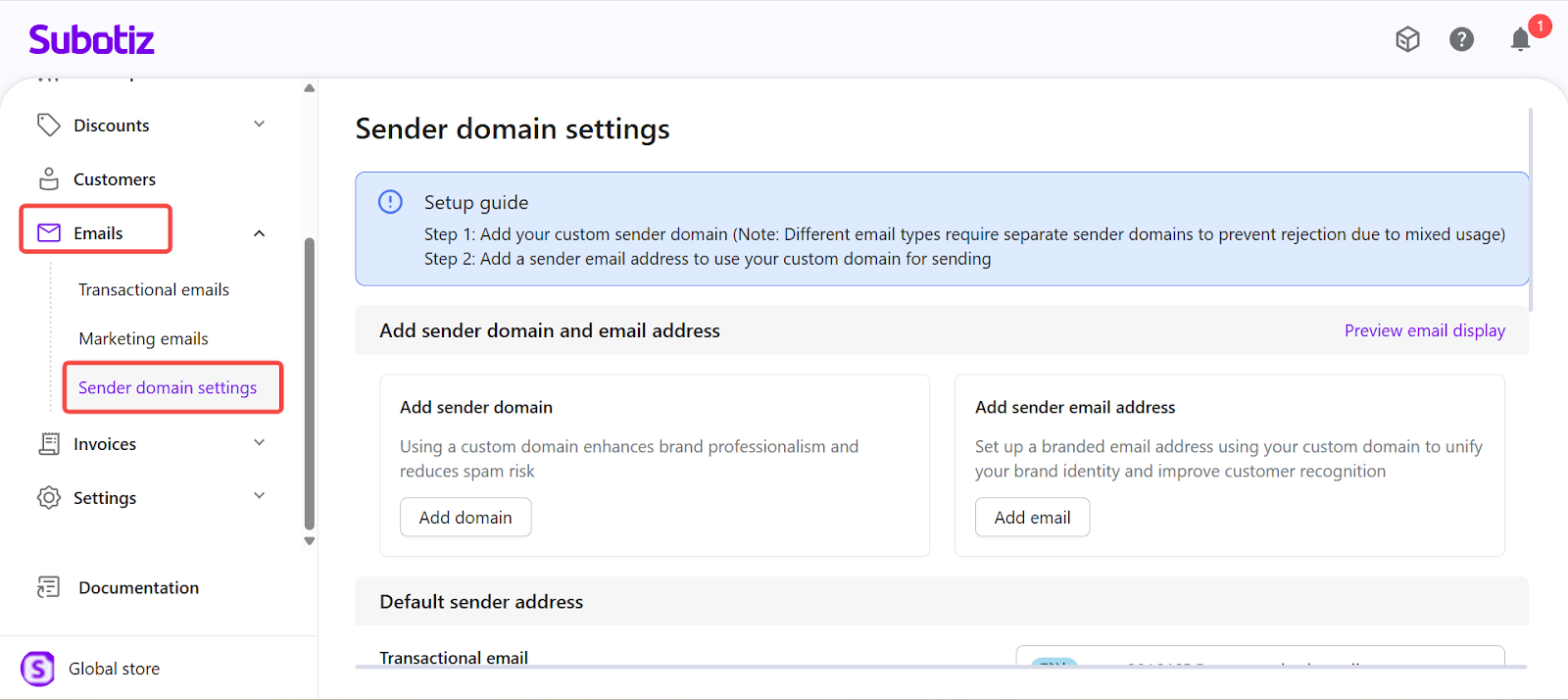
Access Sender domain settings: In the Subotiz admin, go to Emails > Sender domain settings.
The page allows you to:
- Add and verify custom sender domains.
- Configure sender email addresses under verified domains.
- Set default sender addresses separately for transactional emails and marketing emails.
Configuring a sender domain in Subotiz improves inbox placement, builds brand trust, and ensures critical messages reach customers consistently. Verified domains reduce the risk of messages being flagged as spam and give customers a consistent, professional communication experience.