Customer profiles are the identity layer behind every subscription, payment, and billing activity in Subotiz. Each profile consolidates contact information, purchase records, and subscription details into a single, reliable source of truth. This helps ensure accurate billing, clean data management, and efficient support workflows across the entire subscription lifecycle. This article explains how customer profiles are structured, how they are created across different system entry points, and how identity logic affects profile creation and reuse within Subotiz.
Profile Structure and Linked Records
Each customer profile is designed to centralize key contact and billing information for accurate tracking. The structure includes:
- Name: The customer’s name, collected from the checkout page or payment method.
- Email address (optional): If provided, it must be unique within the Subotiz account. When no Customer ID or External Customer ID is supplied, the system may use the email address to determine whether an existing customer profile should be reused.
- Customer type: Automatically assigned as customer or guest.
- Email subscription: Indicates whether the customer has opted in to receive marketing or service-related emails. This field is captured during checkout or API sync and helps merchants manage communication preferences.
- Customer ID: A unique identifier generated by Subotiz. This internal ID is mandatory for tracking and cannot be customized.
- External customer ID: An optional identifier provided by merchants when syncing customer profiles from external systems. Useful for CRM or ERP integrations.
- Created at: Timestamp of when the customer profile was introduced into the system.
- Invoice and refund history: Complete log of payments and refunds tied to the profile.
- Subscription contract ID: A unique identifier generated by Subotiz when a subscription is created. Each contract ID represents a distinct subscription relationship. A single customer profile may be linked to multiple subscription contract IDs.
- Custom data: Stores merchant-defined extension fields for internal reference or system integration. These fields are not used for customer identification or profile matching.
Creating and Identifying Customers
Customer profiles can be created through checkout, API-based creation, or admin actions such as manual creation and file import. Subotiz applies a priority-based logic to determine whether a new profile should be created or linked to an existing one.
When initiating a checkout session or sending an API request, one of the following identifiers must be included:
- Subotiz Customer ID
- External Customer ID
- Email address
The system checks for a match in this order:
- If a valid Subotiz Customer ID is provided and matches an existing profile, it will be used.
- If no match is found, the system checks for an External Customer ID.
- If still no match, the system checks the email address.
- A new profile is created only if an external customer ID or email address is provided and no existing profile matches. If no valid identifiers are present, profile creation will not proceed.
Customer profiles may enter the system through the following admin and system entry points:
- API-based creation: Merchants can create profiles programmatically for CRM syncs or user pre-registration. The request must include at least one valid identifier. Providing only a Subotiz Customer ID will not create a new profile unless it already exists in the system.
- Checkout-based creation: When a checkout session starts, Subotiz automatically checks for existing profiles using the same identification logic. If no matches are found, a new profile is created to capture the billing identity.
- Manual creation in the admin: Merchants can create individual customer profiles directly in the admin to register or maintain customer records.
- Excel import (admin): Merchants can introduce customer profiles through Excel import using a standardized file template in the admin. This method supports bulk creation or updates of customer records and follows the same customer identification logic based on email address or External Customer ID.
All customer profiles created through these entry points follow the same lifecycle and behavior once stored in the system.
Customer Types
Subotiz assigns customer type based on the contents of the cart:
- Customer: Created when the cart includes at least one subscription product.
- Guest: Created when the cart includes only one-time purchases.
Role in Checkout
During checkout, Subotiz links the transaction to an existing customer profile using the first valid identifier from the priority list. This ensures data consistency across all records.
When an existing Customer ID is used:
- Contact fields such as name and email become read-only.
- The session pre-fills customer data from the existing profile.
- All billing and subscription records are linked to the same customer.
Viewing Customers in the Admin
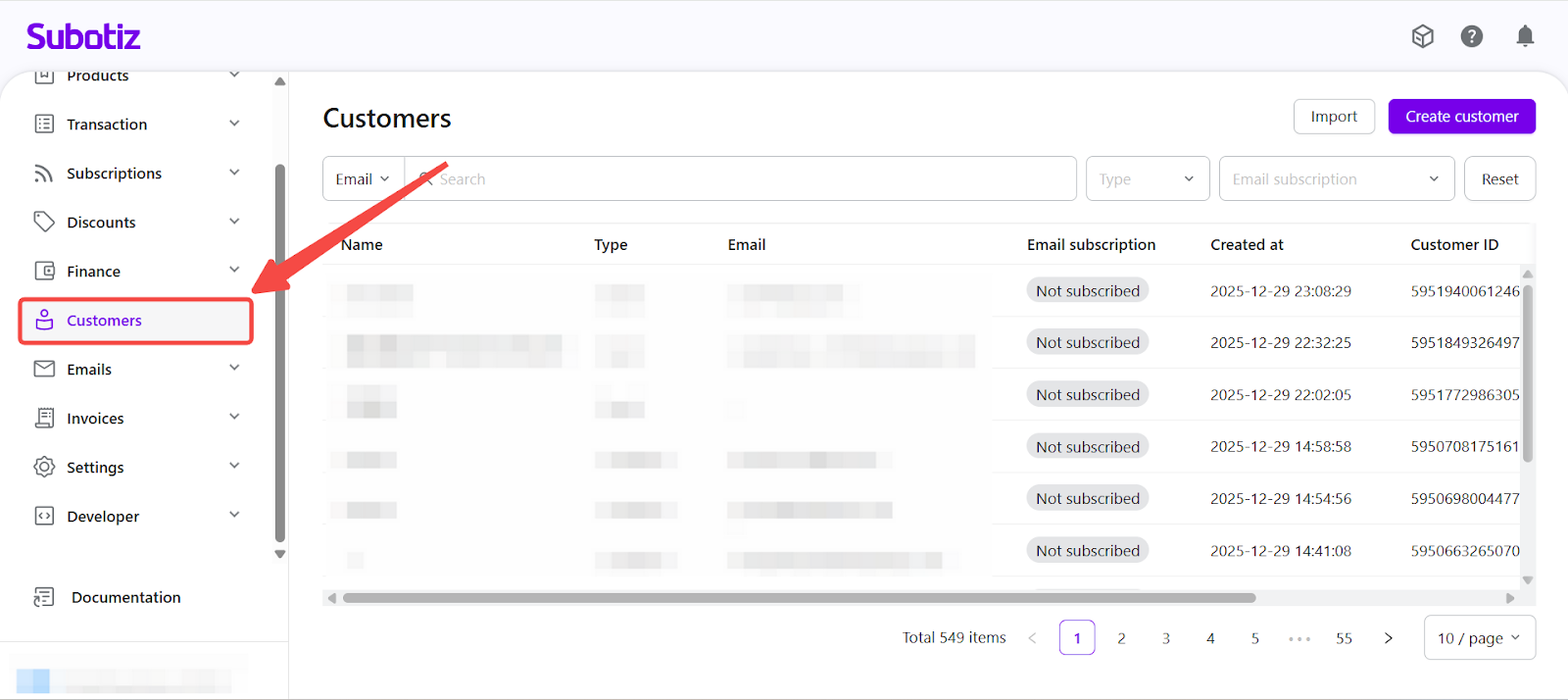
Access customer records: Go to the Customers section in the Subotiz admin. Each row displays key details such as name, type, email, subscription opt-in status, creation date, Customer ID, and External Customer ID.
From this dashboard, you can:
- Filter customers by type (customer or guest) or by email subscription status.
- Search by email, Customer ID, or External Customer ID.
- Click any record to open the full profile.
- Edit customer profile details, such as address information and preferences.
- View subscription details, billing history, and refunds.
Customers are the foundation of every subscription and payment in Subotiz. Maintaining clean, consistent customer data supports accurate billing, complete record-keeping, and better support workflows.
Next step: Understanding Invoices.