In Subotiz, a subscription contract records the relationship between a customer and a pricing plan and serves as the core record within the subscription management system. When a customer creates a subscription, Subotiz automatically generates a contract to manage subscription models, billing cycles, contract status, and related billing records, helping merchants centrally manage and review subscription data.
Subscription Models and Contract Relationships
Each subscription contract represents a subscription relationship between a customer and a specific pricing plan. Subotiz uses a unified contract structure across subscription models to keep subscription records consistent and easier to manage.
Subotiz supports the following subscription models:
-
Recurring Subscriptions: Recurring subscriptions are the default auto-renewal model. Billing continues according to the configured billing cycle until the subscription is canceled by either the merchant or the customer.
- Automatic renewal
- No predefined end date
-
Designed for ongoing services and long-term subscriptions
-
Fixed-Term Subscriptions: Fixed-term subscriptions are designed for subscriptions with a defined service duration. The system calculates the subscription term based on the configured renewal periods and automatically stops renewal after the final billing cycle without requiring customer cancellation.
- Have defined renewal periods
- End automatically when the configured term is completed
- Do not generate additional renewals after the final term
- May support conversion to recurring subscriptions when enabled
Fixed-term settings are configured at the subscription contract level rather than the product or pricing level. As a result, different customers purchasing the same pricing plan may have different fixed-term configurations.
Trial Support
Subscriptions may include either free or paid trial periods. Trial information is recorded within the subscription contract and managed together with the subscription lifecycle.
Supported trial scenarios include:
- Free trial
- Paid trial
For fixed-term subscriptions, trial periods do not count toward fixed-term billing periods. Fixed-term calculation begins after the trial ends and regular billing starts.
Contract Coverage
The system generates subscription contracts across different subscription models and pricing structures and uses a unified contract framework to store subscription data.
Subscription contracts support:
-
Subscription models:
- Recurring subscriptions
- Fixed-term subscriptions
- Trial subscriptions
-
Pricing types:
- Flat pricing
- Package pricing
- Based on usage
Core Contract Information
Each subscription contract typically includes:
- Subscription ID
- Pricing name
- Customer information (such as customer email)
- Subscription start time
- Contract status
- Billing cycle
- Pricing type
Contract status may include:
- Active
- Trial
- Paused
- Canceled
- Incomplete
These details help merchants quickly understand how a subscription is billed, its current operating status, and the related customer relationship.
Contract Lifecycle and Records
Subscription contracts record not only the current subscription status but also subscription changes and related billing outcomes.
-
Subscription Change Records: Subscription contracts support subscription changes initiated from the admin, including:
- Subscription upgrades
- Subscription downgrades
- Switching to a different pricing plan
- Take effect immediately within the current billing cycle
- Take effect at the end of the current billing cycle
- Generate prorated charges or refunds
The system records the effective time of each change and links related billing outcomes, helping merchants clearly track subscription history and financial impact.
For fixed-term subscriptions, actions such as subscription modification, pause, or restart may affect term calculation and expiration timing.
-
Cancellation, Refunds, and Billing Records: Charges and refunds are processed through trade orders, while subscription contracts provide a centralized view of related billing activity.
- Charges for each billing cycle
- Prorated charges or refunds generated by subscription changes
- Refunds associated with subscription cancellations
- Related invoices and transaction outcomes
For fixed-term subscriptions, automatic expiration at term completion and cancellation at the end of a billing cycle are independent mechanisms. If a subscription has already been canceled, cancellation logic takes priority over fixed-term expiration rules.
This centralized record helps merchants reconcile billing activity, support operational analysis, and manage customer inquiries.
Viewing Subscriptions in the Admin
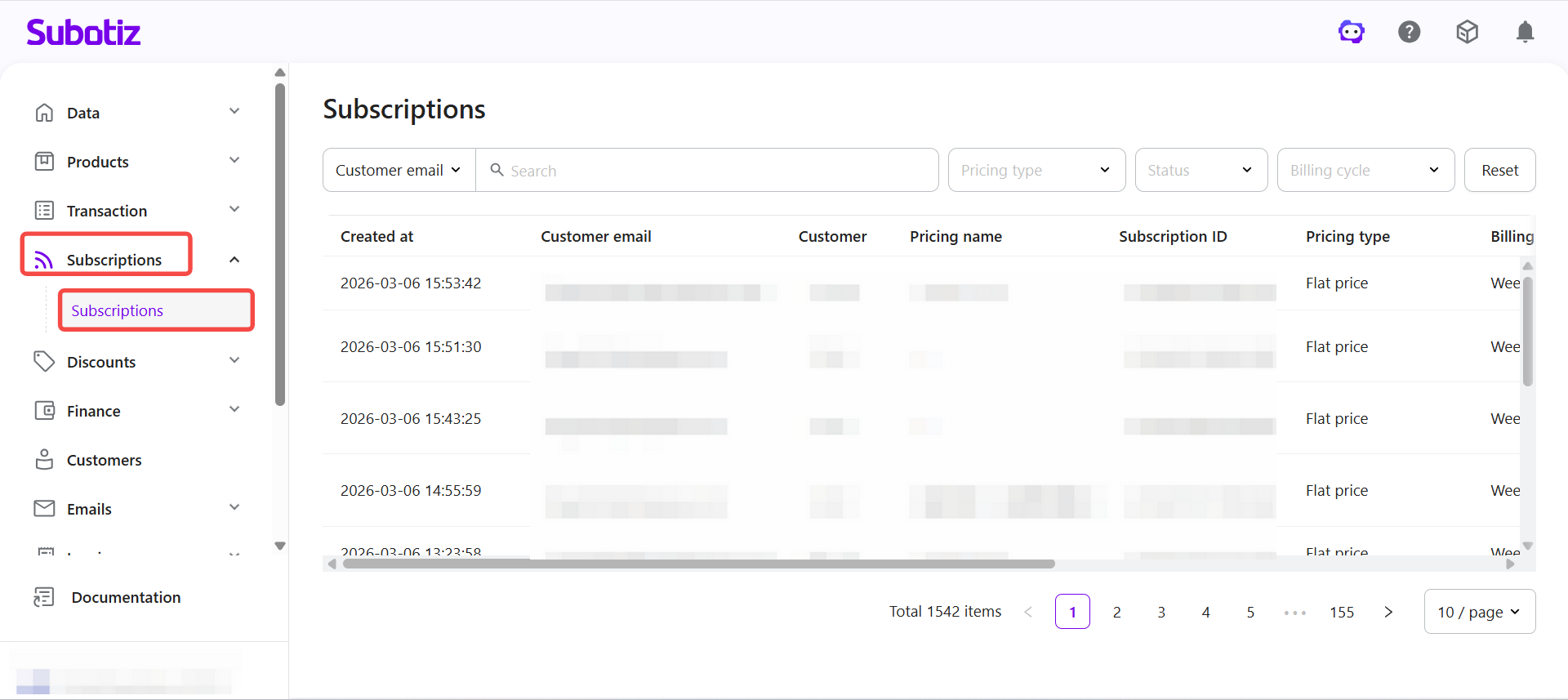
Access the subscription list: Log in to Subotiz Admin, then go to Subscriptions > Subscriptions to view all subscription contracts.
The subscription list typically displays:
- Created time
- Customer email
- Customer
- Pricing name
- Subscription ID
- Pricing type
- Billing cycle
- Currency
- Status
- Price
From this page, merchants can:
- Search for subscriptions using fields such as customer email, pricing name, Subscription ID, customer ID, trade order ID, or refund order ID
- Filter subscriptions by pricing type, contract status, or billing cycle
- Open any subscription to view full contract details and related billing records
Subscription contracts are the core record within Subotiz subscription management. Through a standardized contract structure, merchants can centrally manage customer subscription relationships and maintain clear visibility into subscription status, billing history, and related transaction records.
Related Articles
To learn more about subscription operations, continue with the following articles:
These articles provide additional guidance on subscription management, modification, cancellation, and refund handling to help merchants better understand subscription workflows.