The Dispute Management feature in Subotiz consolidates disputes from Subotiz Payments and PayPal into a single dashboard, allowing merchants to clearly view dispute cases and their current status. By centralizing all disputes, merchants can track activity, understand dispute reasons, and respond within deadlines to protect revenue and customer trust.
Understanding Disputes
A dispute occurs when a customer challenges a payment with their bank, card issuer, or payment provider instead of contacting the merchant directly. The payment channel opens a formal case that requires a response within a set deadline. If no response is submitted in time, the case is automatically closed in favor of the customer.
Types of Disputes
Disputes may be triggered in several ways. The most frequent categories include:
- Credit not processed: Refund not issued for a return, cancellation, or unused service.
- Duplicate: Customer was charged multiple times for the same order.
- Unauthorized: Customer did not authorize the payment. Often linked to fraud or mistaken charges. These are challenging to win since authorization systems typically show valid approval.
- Product not received: Customer claims the purchased product or service was not delivered.
- Product unacceptable: Customer reports the product was defective, damaged, or significantly different from the description.
- Subscription canceled: Customer was charged even after canceling a subscription.
- Unrecognized: Customer does not recognize the charge on their bank or card statement.
- Other cases: Cases outside the above categories, requiring further clarification with the customer.
Handle Disputes
To improve the chances of a successful outcome, merchants should follow these steps:
- Review case details: Go to Transaction > Disputes to check the order information, case ID, and dispute reason.
- Gather evidence: Collect proof such as order confirmations, delivery records, refund history, or customer communication.
- Submit a response: Follow the required process based on the payment provider.
- For Subotiz Payments, respond directly in the Subotiz admin.
- For PayPal, continue case handling in the PayPal Resolution Center.
- Track progress: Monitor updates in the dashboard until the case is resolved by the payment channel.
Final outcomes are determined by the payment channel. Subotiz provides centralized management and tracking but does not participate in the decision process.
Dispute Handling Rules
Before responding to a dispute, merchants should be aware of the following:
- Response deadline: Evidence must be submitted before the response deadline. Missing the deadline results in an automatic loss.
- Independent adjudication: Dispute outcomes are decided by the card issuer or payment provider, not by Subotiz.
- Platform role: Subotiz provides centralized management and status tracking only and does not participate in the adjudication process.
Dispute Record Fields
Each dispute record in Subotiz includes the following fields:
- Payment provider: Subotiz Payments or PayPal.
- Payment method: Such as credit card or PayPal.
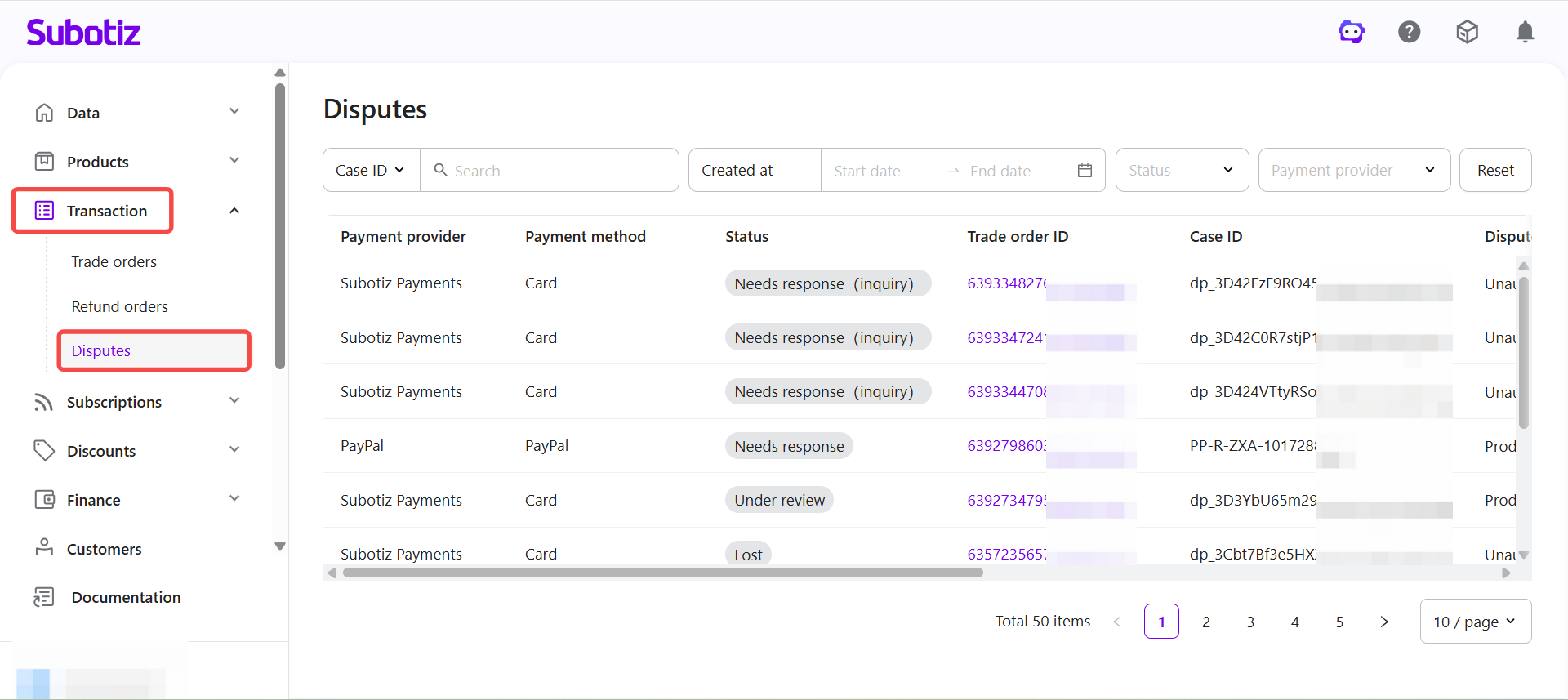
- Status: Current stage of the case, such as Needs response (inquiry), Needs response, Under review, or Lost.
- Trade order ID: Links the dispute to the original trade order. Clickable to open the order detail.
- Case ID: Reference number assigned by the payment provider.
- Dispute reason: Reason code provided by the payment channel, such as Unauthorized or Product not received.
- Disputed amount: Value under dispute.
- Created at: Date the dispute was opened.
- Response deadline: Last date to submit evidence.
- Updated at: Most recent activity on the case.
Business Value
- Centralized management: Review disputes from Subotiz Payments and PayPal in one place.
- Reduced risk of missed responses: Reduce the need to log into each provider separately, reducing the risk of missing deadlines.
- Faster resolution: Visibility of all case statuses and deadlines helps merchants prioritize responses.
Viewing Disputes in the Admin
Open Disputes: Go to Transaction > Disputes in the Subotiz admin to view all disputed orders from supported payment channels. Use filters such as case ID, trade order ID, created at date, status, or payment provider to locate specific cases.
From this page, merchants can:
- Review case details: Including dispute reason, disputed amount, and response deadline.
- Open a dispute record: To proceed with handling in the appropriate channel.
- Track case progress: And view final resolution outcomes.
Disputes are a natural part of digital and subscription businesses. Subotiz consolidates all cases in one place, helping merchants respond on time with the right evidence and safeguard revenue, while final outcomes remain with the payment provider.