Trade orders in Subotiz serve as the central record for tracking all billing activity, including subscription activations, renewals, usage-based charges, and one-time purchases. Each trade order corresponds to a merchant order, ensuring payment outcomes remain consistent with internal order records.
Role in the Billing System
Trade orders act as the single source of truth for all billing activities throughout the payment lifecycle.
- Track order status: View the real-time payment status and outcome of each order.
- Act as the data source: Invoices, refunds, and dispute handling are generated and updated based on trade orders.
- Support reconciliation: Verify transaction amounts against settlement data to ensure accuracy and consistency.
- Capture the full lifecycle: Use the timeline to track payments, refunds, and exception handling.
Trigger Events for Trade Orders
The system automatically creates a trade order in the following scenarios:
- Create a subscription: Records the initial transaction when a new subscription is activated.
- Process renewal: Captures recurring billing activity when a subscription renews.
- Complete a one-time payment: Creates a transaction record for one-time purchases.
- Save a payment method: Records authorization activity when a payment method is attached during a trial (including zero-amount authorization).
- Generate usage charges: Produces billing records for token-based or usage-based charges.
- Verify a payment method: Logs validation results during payment method verification (such as a zero-amount charge).
- Use OpenAPI: Records transactions initiated through the OpenAPI.
Trade Order Fields
Each trade order includes the following key fields:
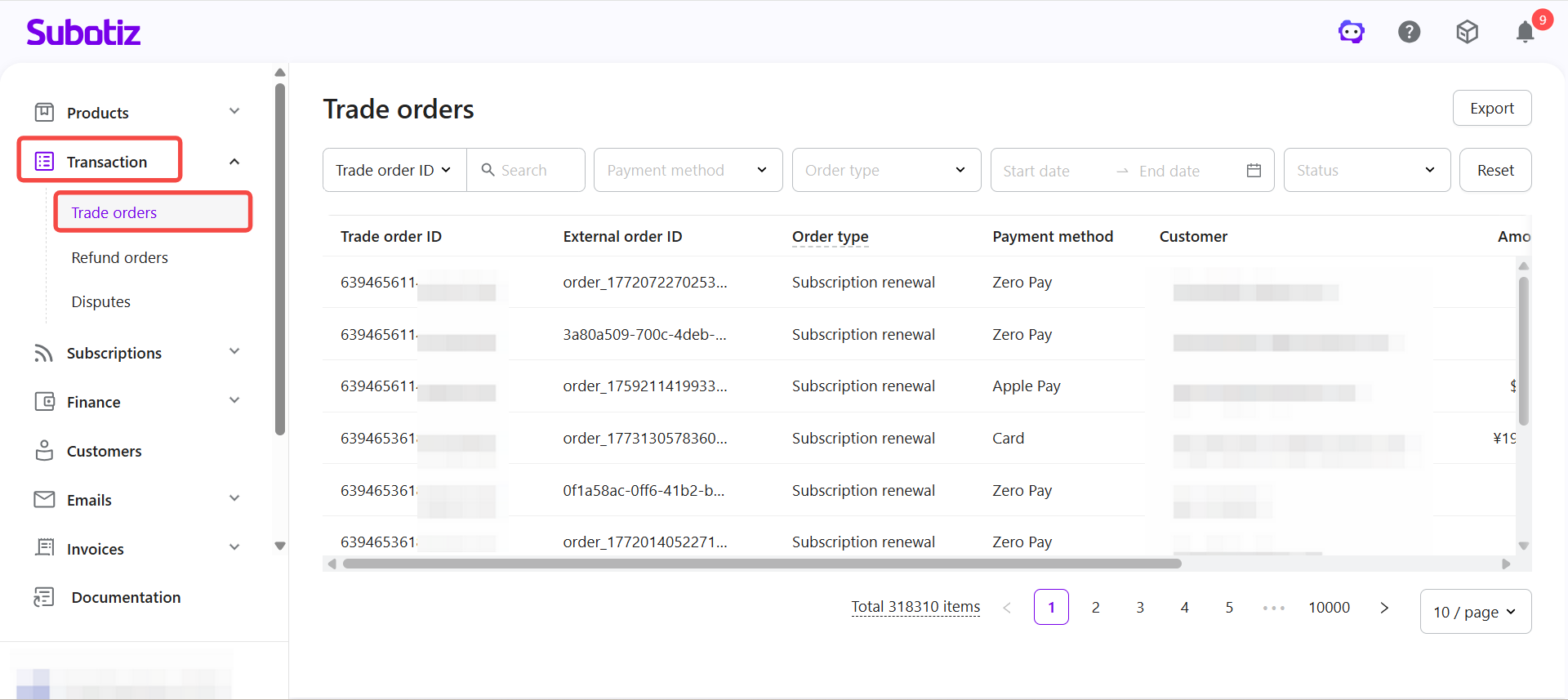
- Trade order ID: Unique identifier generated by Subotiz.
- External order ID: Corresponding order reference from the merchant's system, if available.
- Order type: Subscription activation, renewal, one-time purchase, or usage-based charge.
- Payment method: Such as Card, PayPal, Apple Pay, or other supported options.
- Customer: Customer email address, or internal customer ID if no email is available.
- Amount: Total amount charged for the order.
- Created at: Timestamp of order creation.
- Status: Current processing state of the trade order.
Order Status Descriptions
Trade order statuses reflect the processing stage and final outcome of each payment.
- Pending: The order has been created, but the customer has not completed payment or the result has not yet been returned.
- Under review: The customer has submitted payment, and the payment provider is processing the request. The result has not yet been confirmed.
- Paid: Payment has been confirmed by the provider and funds have been received.
- Partially refunded: A portion of the order amount has been refunded.
- Refunded: The full order amount has been refunded.
- Payment failed: The payment was declined by the provider, for example due to insufficient funds, failed verification, or risk controls. The customer can retry the payment.
- Closed: The trade order is closed after repeated failures or timeout. Closed orders cannot be paid again.
Related Billing Records
Trade orders are connected to other billing data to provide a complete view of fund movement.
- View refunds: Track refund requests and their final outcomes.
- View disputes: Monitor chargebacks and dispute resolution progress.
Managing Refunds
All refunds are initiated from the original trade order to ensure consistent fund handling.
- Initiate a refund: Create a refund request from the trade order and process it through the original payment method.
- Generate a refund record: The system automatically creates a refund record and tracks its status.
- Update order status: Once completed, the trade order is updated to Partially refunded or Refunded.
- Sync invoice status: Related invoices are automatically updated to reflect the refund.
Viewing Trade Orders in the Admin
View Trade orders: Go to Transaction > Trade orders in the Subotiz admin to access all records.
- Search orders: Search by trade order ID, external order ID, subscription ID, invoice ID, customer email, customer name, customer ID, product name, product ID, pricing name, pricing ID, or card last four digits.
- Filter records: Filter by order type, status, or payment method.
- Select a date range: Use the date filter to apply a start and end date.
- View details: Click any order row to open the detail page and review full transaction data and refund history.
Trade orders centralize all billing records in Subotiz, connecting payments, refunds, and disputes in one place. They provide a clear and fully traceable view of the billing workflow and support accurate reconciliation.